

Spline is used for interactive 3D design and motion experiences, while Lottie is used for lightweight 2D vector animations. They are not the same, and each serves different purposes.
You can use spline when you need immersive 3D visuals that respond to user actions like hover, click, scroll, and mouse movement.
On the other hand, use lottie when you need lightweight 2D vector animations such as icons, loaders, and simple UI motion effects.
Besides use cases, they also differ in performance, complexity, file structure, and more.
In this spline vs lottie comparison guide, you will learn their key differences and understand which tool is best suited for your design needs.
Let’s get started.
Spline vs Lottie: Quick Comparison Table
| Factor | Spline | Lottie |
| Main Purpose | Interactive 3D web visuals | Lightweight UI animation |
| Animation Type | 3D scenes and objects | 2D vector animations |
| File Size | Heavy | Lightweight |
| Interactivity | Rich interactions | Basic triggers |
| Performance Impact | Higher impact if complex | Low impact when optimized |
| Platform Support | Mainly web | Web, mobile, apps |
| Strength | Memorable 3D experience | Fast and scalable |
| Limitation | Can be heavy if overused | Not for full 3D scenes |
| Best Choice When | You need 3D impact | You need small animations |
What is Spline?
Spline is an 3D visual element that can be created using the Spline, a browser-based 3D design tool. With this, you create 3D objects, animated scenes, and interactive visuals that feel more realistic.
While creating a Spline, you can add shapes, materials, lighting, motion, and user interactions. After creation, you can embed the Spline into a website with its 3D scene, animations, and interactions.
That means you can use the same 3D design on a website as an interactive visual experience. Moreover, the Spline scene embedding process is easy and can be done by copying the embed code.
Note: Using Divi? Check out our guide on How to Embed Spline Scenes in Divi.
Pros of Spline
- Adds interactive 3D visuals to websites
- Supports hover, click, scroll, and mouse movement
- Useful for hero sections and product showcases
- Helps present objects with depth and motion
- Creates a more immersive user experience
- Can be embedded with scene animations and interactions
Cons of Spline
- May increase page loading time
- Not ideal for very simple UI animations
What is Lottie?
Lottie is a lightweight animation format used to add smooth 2D vector animations to websites and apps.
A Lottie animation is usually stored as a JSON file or a .lottie file. Because it is vector-based, it can scale across different screen sizes without losing quality.
Lottie is commonly used for animated icons, loaders, buttons, onboarding illustrations, empty states, and small UI motion effects. It helps make a website or app feel more interactive without using heavy video or GIF files.
Pros of Lottie
- Fast loading and performance-friendly
- Scales clearly on different screen sizes
- Keeps animation quality sharp
- Easy to use on websites and apps
- Supports smooth UI animations
- Works well for icons, loaders, and micro-interactions
Cons of Lottie
- Not suitable for complex 3D animations
- Limited support for some After Effects features
- Editing JSON files manually is difficult
- Large or detailed animations can still affect performance
Spline vs Lottie: Key Differences (In Detail)
Now that you know about Spline and Lottie in detail, along with their key capabilities, let’s dive into their differences. We will compare them across use cases, performance, design flexibility and more.
Let’s get started:
Design Style: 3D vs 2D Motion
Spline is best when the animation is a main visual part of the website. It adds depth, space, lighting, and interactive 3D movement.
Lottie is better for small UI animations that support the user experience, such as icons, loaders, buttons, onboarding screens, and empty states.
Winner: Tie. Spline for 3D visuals. Lottie for 2D motion.
Animation Capabilities: Which Tool Creates More Advanced Animations?
Spline is better for advanced 3D animations. It can include object movement, rotation, camera motion, lighting effects, hover effects, scroll-based movement, and interactive scenes.
Lottie is better for smooth 2D animations and supports motion features like shape animations, path movement, masks, opacity changes, scaling, rotation, looping, and more.
Here is a quick breakdown of their animation capabilities:
| Factor | Spline | Lottie |
| Animation type | 3D animation | 2D vector animation |
| Common effects | Rotation, camera movement, lighting, scroll, hover | Shape, path, opacity, scale, rotation, loop |
| Best for | Product motion and interactive 3D scenes | Icons, loaders, onboarding, and micro-interactions |
Winner: Tie. Spline for advanced 3D, Lottie for lightweight 2D motion.
Interactivity: Which One Provides Better User Interactions?
Spline gives users more control over the visual experience. A 3D scene can respond to hover, click, scroll, mouse movement, and other actions. This makes it useful for interactive hero sections, 3D product previews, and creative landing pages.
Lottie can also respond to actions like hover, click, play, pause, or scroll, but it is usually better for simple UI feedback rather than deep interaction.
Here is a quick breakdown of their interactivity:
| Factor | Spline | Lottie |
| Interaction level | High | Basic to moderate |
| Common triggers | Hover, click, scroll, mouse movement | Play, pause, hover, click, scroll trigger |
Winner: Spline
Performance and Page Speed:Which One Loads Faster?
Lottie is usually faster because it uses lightweight 2D vector animation data. This makes it a better choice for icons, loaders, buttons, and repeated animations across a website.
Spline is usually heavier because it renders 3D objects, materials, lighting, camera movement, and interactions. It works best when used in important sections like hero areas or product showcases.
Here is a quick breakdown of how they compare in performance:
| Factor | Spline | Lottie |
| Loading weight | Usually heavier | Usually lighter |
| Browser workload | Renders 3D objects and interactions | Plays vector animation data |
Winner: Lottie (As it only handles 2D animation data)
Mobile Responsiveness: Which One Works Better on Mobile Devices?
Lottie is easier to use on mobile because it is lightweight, scalable, and keeps its quality on different screen sizes.
Spline can also work well on mobile, but it depends on the complexity of the 3D scene. Heavy objects, lighting, or interactions may need extra optimization.
Winner: Tie (Lottie is easier for mobile, but Spline offers better responsive control for 3D visuals.)
SEO Impact: Which One Helps You Rank Higher?
Spline and Lottie do not directly improve SEO. Their SEO impact mostly depends on how they affect page speed, Core Web Vitals, and user experience.
Lottie is usually safer because it is lightweight. Spline can create stronger visual engagement, but complex 3D scenes may slow down a page if they are not optimized.
Winner: Tie
Design Freedom: Who Offers More Flexibility?
Spline offers more freedom for creating unique 3D visuals. You can control objects, lighting, depth, camera views, materials, motion, and interactions.
Lottie gives strong flexibility for 2D motion, but it is more limited when it comes to depth and spatial design.
Here is a quick breakdown of their design flexibility:
| Factor | Spline | Lottie |
| Creative control | High for 3D visuals | High for 2D motion |
| Design controls | Objects, materials, lighting, camera, depth | Shapes, paths, timing, opacity, scale |
Winner: Spline
Developer Experience: Which One Is Easier for Developers to Implement?
Spline is easier when you want to embed a complete 3D scene. You can use an iframe, public URL, Spline Viewer, or exported code.
Lottie is easier when you need small UI animations. You usually only need a JSON or .lottie file and a Lottie player, plugin, or library.
So, the easier option depends on the use case. Spline is simpler for ready-made 3D embeds. Lottie is simpler for lightweight UI animations.
Here is a quick breakdown of the developer experience:
| Factor | Spline | Lottie |
| Common implementation | Embed code, iframe, viewer | JSON or .lottie file with a player |
| Setup effort | Easy for embed, more work for advanced control | Easy for most animation use cases |
Winner: Tie
File Size: Which One Is Lighter?
File size matters because heavier animations can slow down a page, especially on mobile devices.
Lottie is usually lighter because it stores 2D vector animation data in JSON or .lottie format. This makes it easier to load and reuse across websites.
Spline is usually larger because it includes 3D objects, materials, lighting, camera settings, animations, and interaction data.
Here is a quick breakdown of their file size difference:
| Factor | Spline | Lottie |
| File weight | Usually larger (500KB–5MB+) | Usually smaller (10–30KB) |
| Stores | 3D objects, materials, lighting, camera, animation, interactions | 2D vector animation data |
Winner: Lottie (Storing only 2D element data makes Lottie lighter)
Spline vs Lottie: Which One Should You Use?
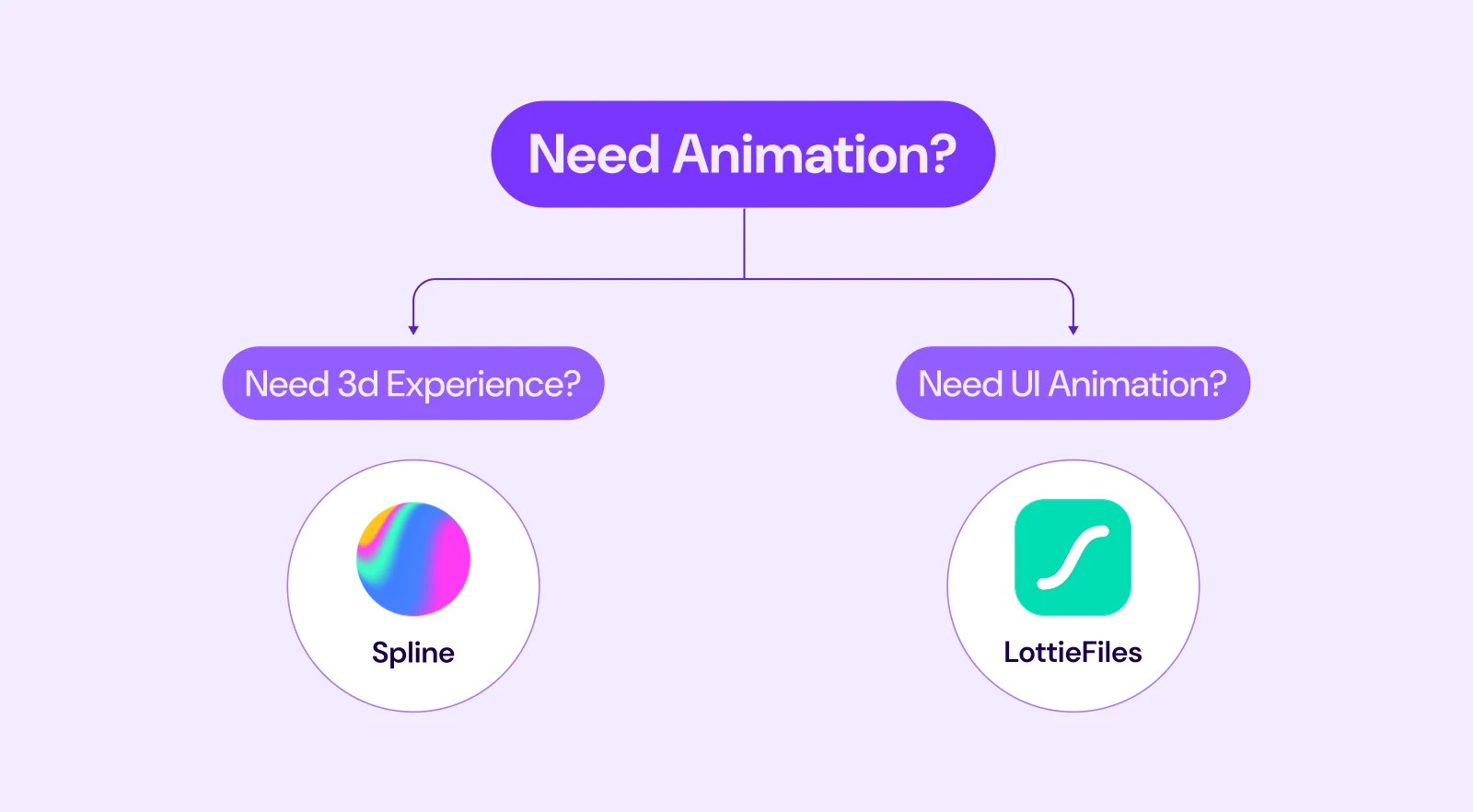
The best choice depends on the role of animation in your design. Use Spline when the animation is a major visual part of the page. It works best for sections where you want depth, interaction, and a strong first impression.
Use Lottie when the animation supports the interface. It is better for small, fast-loading animations that guide users, give feedback, or make the UI feel smoother.
Choose Spline If You Need:
- Interactive 3D visuals
- 3D hero sections
- Product showcases
- Scroll, hover, click, or mouse-based interactions
- A strong visual moment on a landing page
- A more immersive brand or product experience
Spline is a better choice when the animation needs to stand out and become part of the main design experience.
Note: Want to see spline in action? DiviFlash's Spline module comes with ready-made 3D spline examples that you can have a look at.
Choose Lottie If You Need:
- Lightweight 2D animations
- Animated icons or illustrations
- Loaders, buttons, and empty states
- Fast-loading UI motion
- Reusable animations across multiple sections
- Small interactions that improve usability
Lottie is a better choice when the animation should support the user experience without adding too much weight to the page.
Note: Want to see Lottie animations in action? DiviFlash's Lottie module includes ready-made animation demos, explore the examples here.
Can You Use Both Together?
Yes. In many cases, using both gives the best result.
For example, you can use Spline for a main 3D hero visual and use Lottie for smaller animations like icons, loaders, buttons, and micro-interactions.
FAQ
Is Spline better than Lottie?
Not always. Spline is better for 3D and interactive scenes and lottie is better for lightweight vector animations.
Is Lottie good for websites?
Yes. Lottie is widely used for web and app animations because it is lightweight, scalable, and easy to implement.
Can I use Spline and Lottie on the same website?
Yes. You can use Spline for the main 3D visual and Lottie for smaller animations like icons, loaders, and UI feedback.
Is Spline good for beginners?
Spline is easier than many traditional 3D tools, but it still has a learning curve because you need to understand 3D objects, lighting, camera, and scene layout.
Can I Add Spline in Divi?
Yes. You can embed Spline in Divi using the Divi Code Module, or a dedicated Spline module from DiviFlash.
Can I Add Lottie in Divi?
Yes. You can use Lottie in Divi through its newly added Lottie module.
Which is better for website performance, Spline or Lottie?
Lottie is usually lighter. Spline can be heavier because it renders 3D objects, lighting, materials, and interactions. But a well-optimized Spline scene can still work well.
Should I use GIF, Lottie, or Spline?
Use GIF only for very simple cases. Use Lottie for lightweight vector animation. Use Spline for real 3D and interactive scenes.
Does Lottie support 3D animations?
Lottie is mainly built for 2D vector animations. It can create a 3D-like feel using layers, depth, and motion, but it does not support full interactive 3D scenes like Spline.
Final Verdict
Spline and Lottie are not direct replacements for each other as they solve different design problems.
You can use Spline when your website needs real 3D scenes, interactive objects, product-style visuals, or scroll-based experiences.
Alternatively, use Lottie when your website needs lightweight animation, animated icons, loaders, or small UI motion.
Moreover, you can also use both together for a balanced experience. Spline for immersive 3D visuals and Lottie for lightweight UI animations and icons.


0 Comments