

When you look for a hosting plan, how do you find the right “best” for your WordPress site?”
For my growing eCommerce business, speed, scalability, and security matter more than cost.
But for you, it might be an affordable yet reliable plan with decent performance for a new WordPress blog or portfolio site.
So, here, the best one for me, can’t be your best pick.
For the best hosting plan for your site, WordPress officially recommends 3 hosting; Dreamhost, Bluehost and SiteGround. Again, based on user reviews the top WordPress hostings are Hostinger and Cloudways.
However, every hosting provider is built with specific users in mind. Some are built considering the beginners, others for developers, and a few designed mainly for agencies.
To meet every type of site’s requirement, we’ve listed 15 best WordPress hosting providers offering the perfect match for your exact website needs.
So, let’s get started.
Quick Review of 15 Best WordPress Hosting Providers
Before going into the individual hosting plan, let’s get a quick overview of all of them in the comparison table below.
Once you get an initial idea of which providers align with your needs, you can skip reading the whole content and directly jump into the specific ones to get more detail.
| Hosting Provider | Best For | Average Speed | Free Domain | Starting Price (Per Month) | Trustpilot Rating (Out of 5) |
| Hostinger | Beginners & Small Businesses | 1.53s | ✅ | $2.99 | 4.7 |
| Cloudways | Developers & High Performance | 1.29s | ❌ | $11.00 | 4.6 |
| Rocket.net | Enterprise-Level Speed & Security | 1.2s | ❌ | $30.00 | 4.7 |
| Antihost | Small Agencies & Multi-Site Management | 1.55s | ❌ | $3.40 | 4.5 |
| WPX | Bloggers and Dedicated Support | 1.47s | ❌ | $20.83 | 4.1 |
| DreamHost | Affordability & Beginners | 1.16s | ✅ | $2.99 | 4.7 |
| Pressable | Agencies & WooCommerce | 1.45s | ❌ | $25.00 | 4.6 |
| Kinsta | Large Scale Business & E-commerce | 0.889s | ❌ | $35.00 | 4.8 |
| WP Engine | Hassle Free & Security | 0.936s | ❌ | $30.00 | 4.4 |
| Liquid Web | VPS Hosting for Growing Businesses | 1.4s | ❌ | $5.00 | 4.3 |
| SiteGround | Balanced Performance, Simplicity, and Security | 1.33s | ❌ | $3.99 | 4.9 |
| Flywheel | Freelancers & WordPress Agencies | 2.17s | ❌ | $30.00 | 1.6 |
| Hosting.com | High End Security and Speed with cheapest entry level plan | 1.4s | ❌ | $2.99 | 4.7 |
| GreenGeeks | Eco-Friendly WordPress Hosting | 1.035s | ✅ | $2.95 | 4.6 |
| InMotion Hosting | Developers & Scalable Businesses | 1.34s | ✅ | $4.79 | 4.4 |
| Bluehost | Ease of Use & Integrated Tools | 1.29s | ✅ | $3.99 | 3.5 |
Now, let’s jump into the detailed review of each hosting plan.
1. Hostinger (Best Affordable Hosting for Beginners and Small businesses)
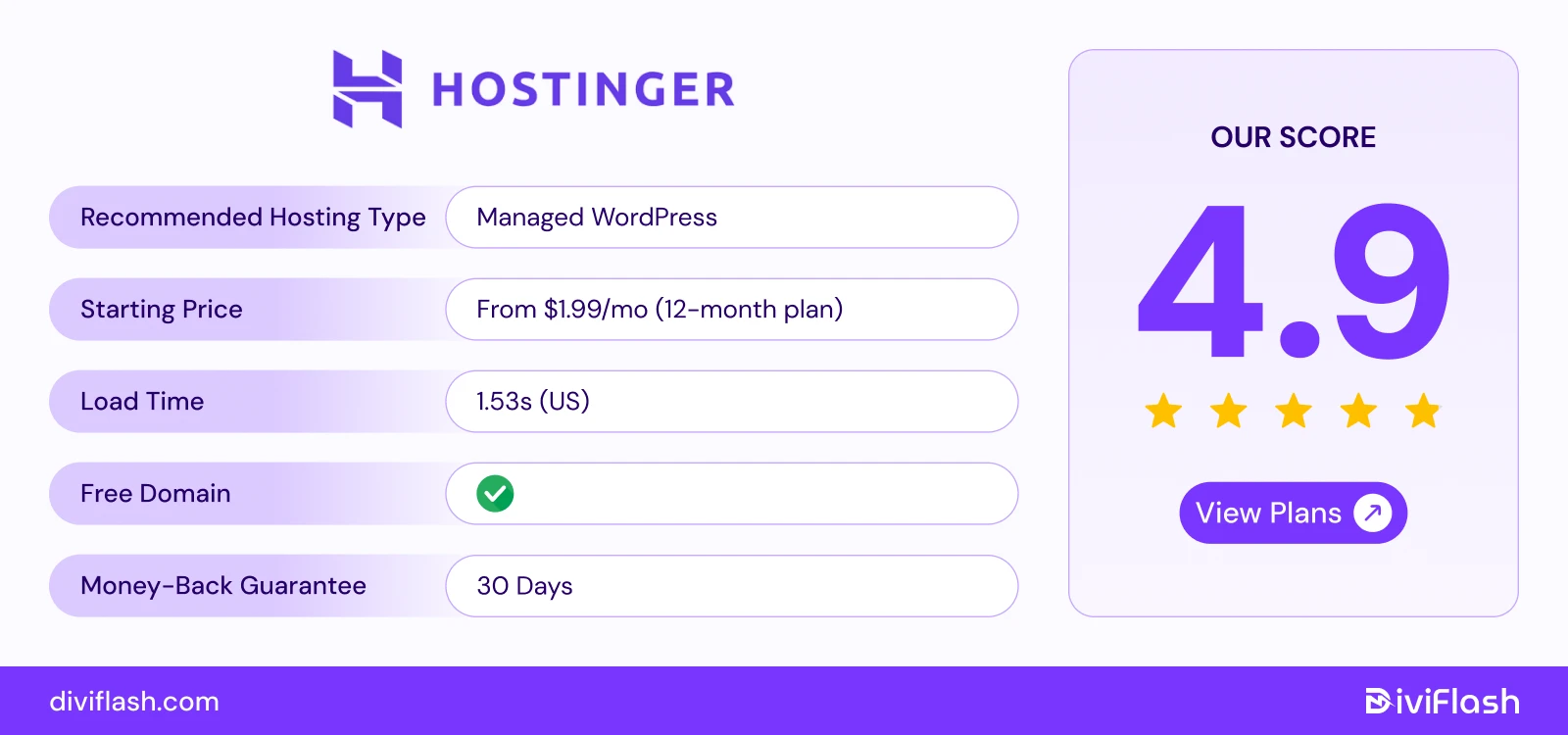
Hostinger has become one of the most popular hosting choices globally because of its strong balance of affordability, performance, and user experience.
If you’re just starting a new site or migrating from another host, Hostinger offers one click WordPress installation with automatic updates, and staging environment. Even, you’ll have a simple web management interface through its custom-built hPanel much easier than general Cpanel.
On top of that, with Hostinger, you’ll get a free website builder with AI support and tools to easily design a site before switching to WordPress or expanding features.
So, Hostinger will be the top recommendation for personal sites, blogs, or startups that need speed and simplicity at a low cost.
Key Features of Hostinger
- Global data centers: There’re total of 11 data centers globally in the US, UK, Brazil, France, Germany, Lithuania, the Netherlands, India. So, it delivers faster load times and consistent performance for users in any region.
- Custom hPanel: Hostinger provides custom hPanel where you can manage everything from page speed, virus detection, to web performance analytics.
- Optimized Performance: Hostinger includes LiteSpeed servers and NVMe SSD storage for stable performance for all WordPress sites. Again, the pre-installed LiteSpeed Cache plugin boosts site speed and Core Web Vitals for SEO.
- Global CDN Integration: Cloudflare in house CDN integration accelerates content delivery 40% faster across worldwide audiences.
- Advanced Security: Free SSL, backups, DDoS protection, WAF, malware scanner, and automated backups provide complete WordPress site protection.
What We Like the Most
- Hostinger is very affordable for beginners starting their first website and it actually perfectly balances price, security, speed than the other hosting plans.
- The built-in AI troubleshooter automatically finds and suggests fixes for common errors.
- As your website grows, you can easily move from shared hosting to cloud hosting without any hassle for long-term growth.
What could be better
- Not all Hostinger plans provide access to every data center location. While Only Shared, Cloud, and WordPress hosting plans can be hosted across all 12 centers.
- Again, Hostinger’s website builder supports up to 1,000 products, and also lacks advanced customization and flexibility. So, it will be suitable only for small WordPress ecommerce stores.
Price of Hostinger
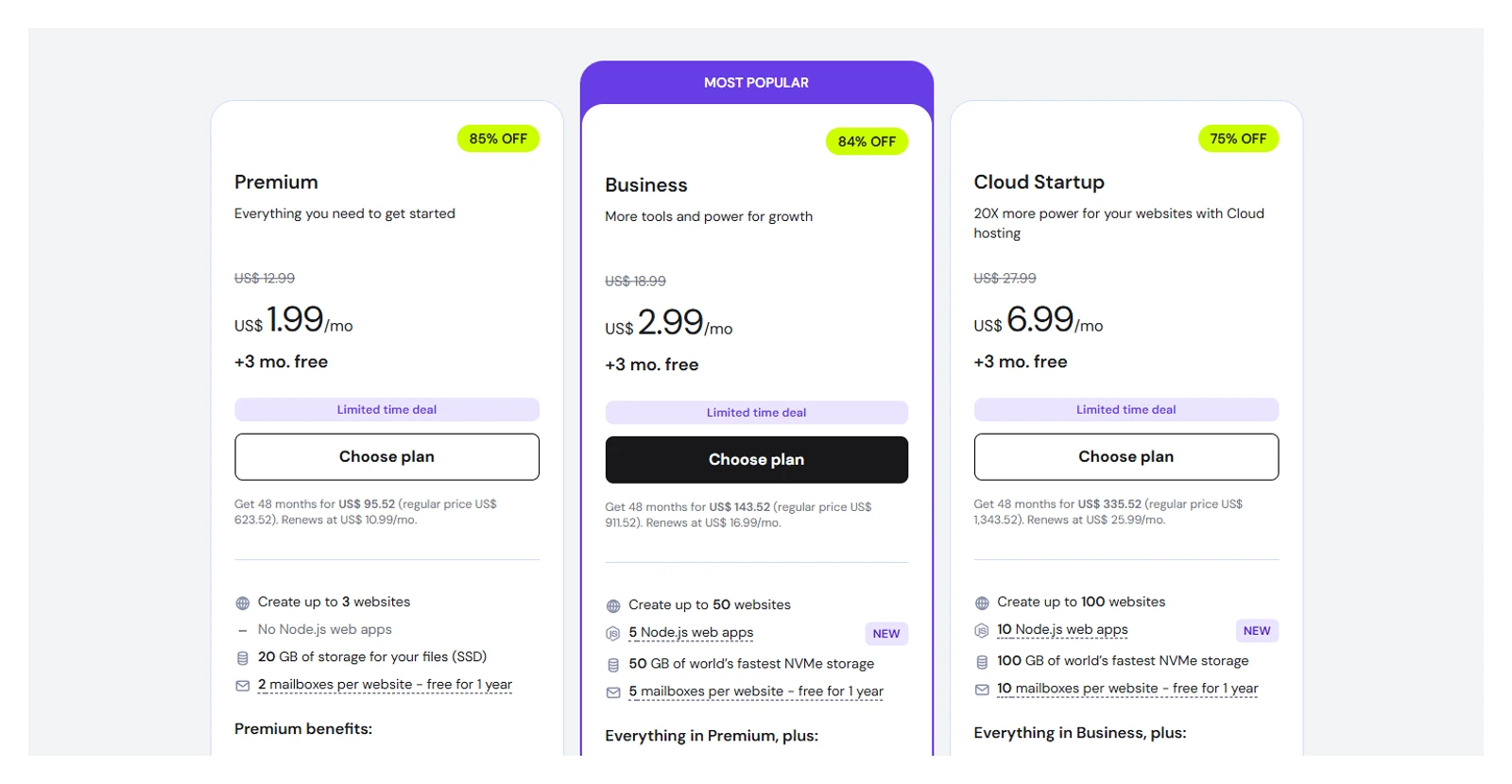
- Web hosting: Starting at $2.99/ month for 25 websites
- VPS hosting: Starting at $4.99/ month for 50 websites
- Cloud Startup: Starting at $27.99/ month for 100 websites
So, if you’re just stating your site, (personal, ecommerce) and you actually want an easy , manageable hosting plan with affordable prices, Hostinger is the right one.
2. Cloudways (Best Cloud Hosting for Agencies, & High-traffic Sites)
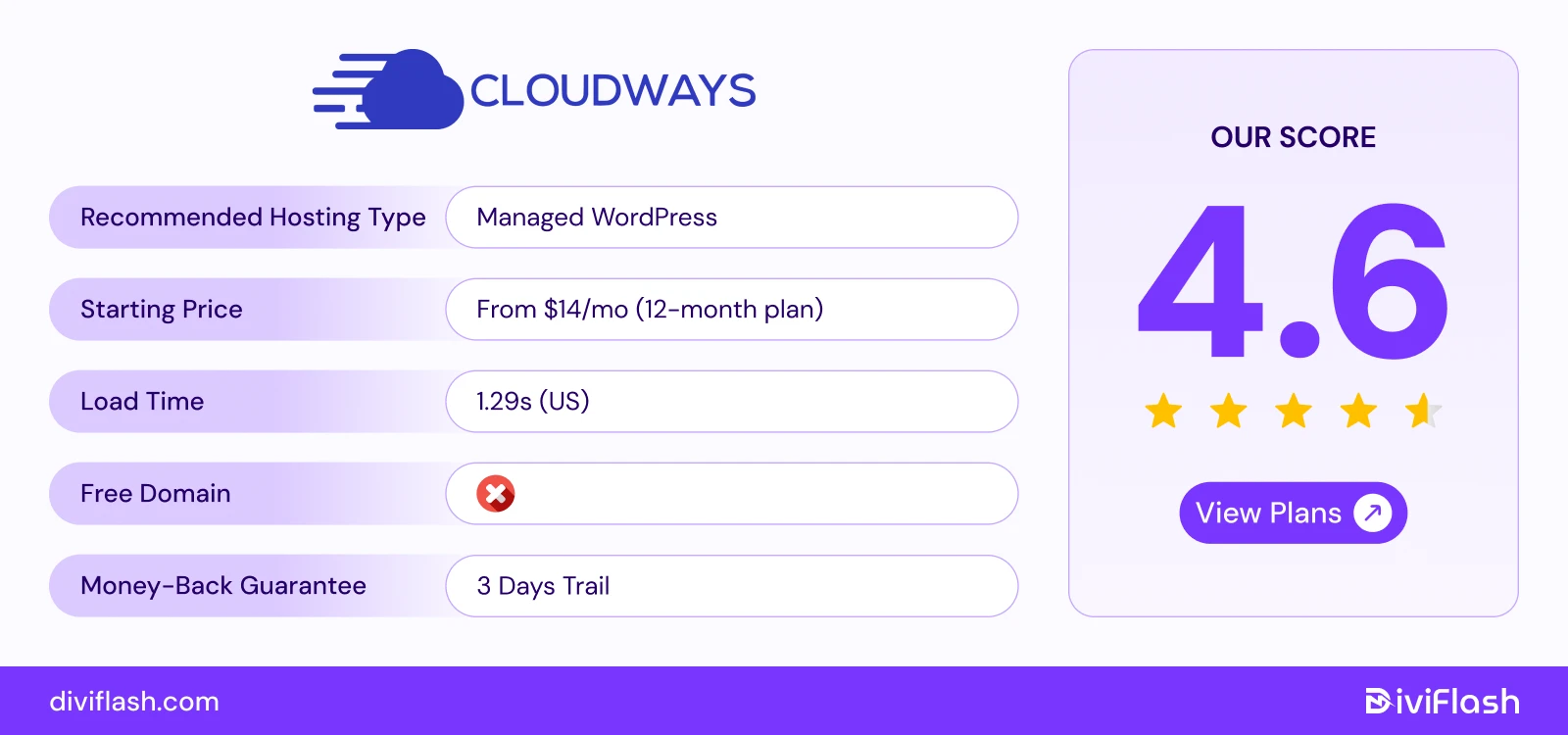
Cloudways stands out as one of the most performance-optimized cloud hosting providers in the market. Unlike traditional shared hosting, Cloudways operates as a managed cloud platform to deploy your WordPress site without handling complex server management.
It’s especially built to control, scalability, and speed from growing eCommerce stores to high-traffic business websites. Cloudways also includes a custom control panel that replaces the traditional cPanel or Plesk.
Again, you can start a small business with Cloudways and grow as your website demands without migrating to a new hosting provider. You can automatically scale the resource limit based on your traffic demand without downtime or migration.
And, to scale your site considering budget & need, you just have to pay only what you use from storage limit, built in addons, and other resources.
Key Features of Cloudways
- Global data centers with multi-Cloud Infrastructure: Cloudways includes 65+ data center locations worldwide for better global reach. Again, it offers 5 World class cloud hosting for WordPress sites on DigitalOcean, AWS, Google Cloud, Vultr, or Linode.
- Fast Performance: Cloudways uses SSD storage and its custom ThunderStack with NGINX, Apache, PHP-FPM, and MariaDB to make websites load faster and perform smoothly.
- Built-in Caching: It comes with Varnish, Memcached, Nginx, and Redis caching pre-installed. These caches help your website respond quickly, even during high traffic.
- Auto-Healing and Monitoring: The servers can fix common issues automatically, reducing downtime with its auto healing feature. You can track over 15 real-time metrics like CPU and RAM usage and others through the Cloudways dashboard.
- WordPress Optimization Tools: The Breeze cache plugin and Cloudflare Enterprise add-on are built in to improve page speed, image delivery, and mobile performance. Again, Cloudways’ built-in migrator plugin transfers from any host with zero downtime.
- Strong Security: Every server includes a firewall, free SSL, IP whitelisting, daily backups, and Malcare integration for malware and bot protection.
What We Like the Most
- Cloud hosting often requires technical knowledge, but Cloudways handles setup, server management, and maintenance everything with ease for you.
- It also comes with built-in add-ons for security, performance, and caching, all optimized to run automatically for the best results.
- On top of that, you can choose custom pricing based on storage and bandwidth you need.
What Could Be Better
- Cloudways doesn’t include domain registration or email hosting by default. So, you’ll need third-party services for those.
- Pricing can be higher if you enable additional add-ons like Cloudflare Enterprise or Object Cache Pro.
Pricing of Cloudways
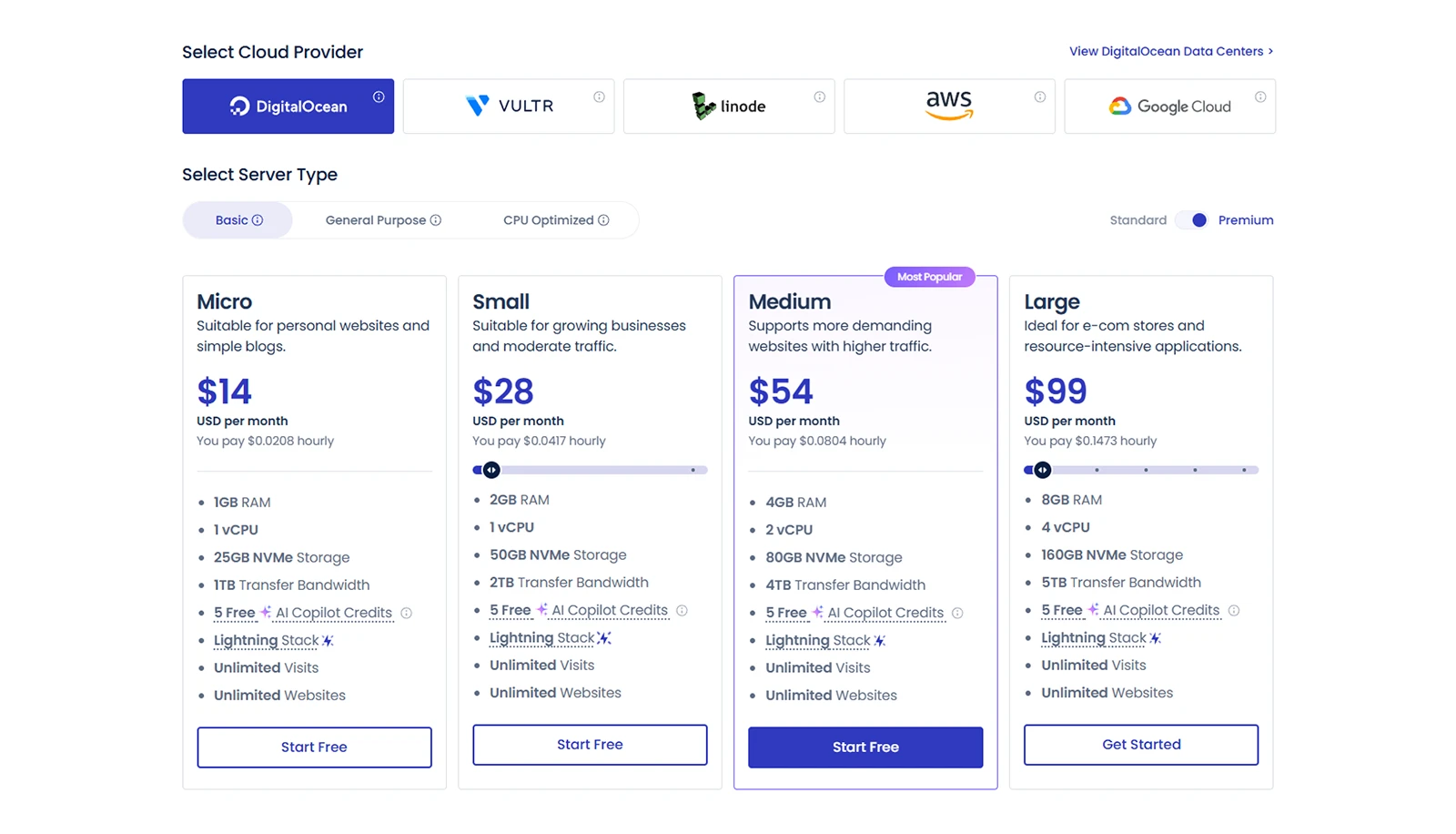
- DigitalOcean standard plan, starts at $11/month
- Vultr & Linode standard plan, starts at $14/month
- AWS standard plan, starts at $20.56/month
- Google Cloud standard plan, starts at $37.33/month
So, if you want a hosting solution that combines cloud-level performance with the easily managed WordPress experience, Cloudways is the clear winner.
3. Rocket.net (Best WordPress Hosting for Super Fast Speed & SEO)
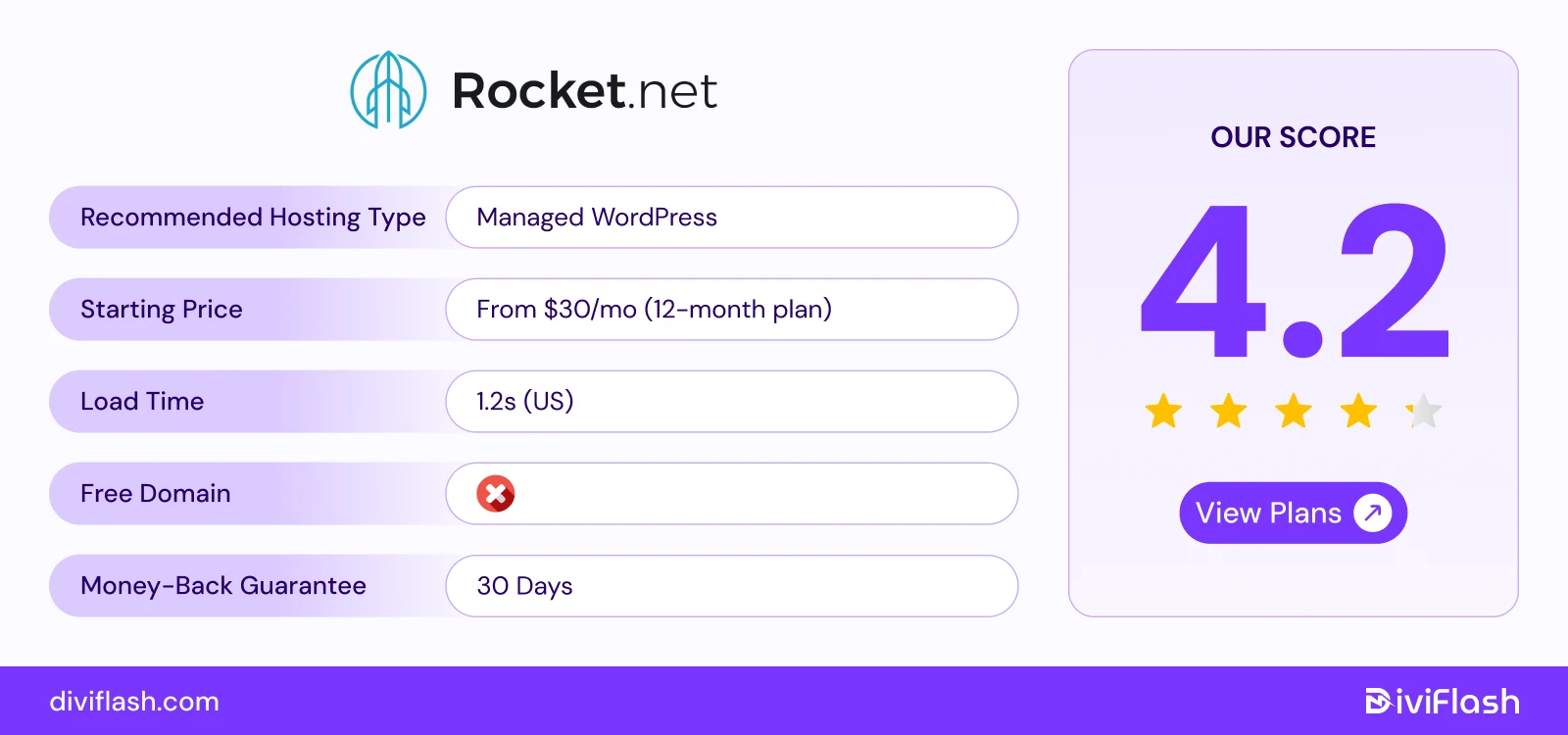
Rocket.net is one of the fastest-growing managed WordPress hosting platforms known for speed, (especially global TTFB of 335ms) and security.
Rocket.net is mostly unique from others is its direct integration with Cloudflare Enterprise CDN. This means every site automatically gets access to premium edge caching, a global CDN, WAF, and DDoS protection, all without extra setup.
Each website on Rocket.net runs in its own secure container so your site stays fast even during heavy traffic. Again, it also gives excellent Core Web Vitals scores (98–100%) and image optimizer for better ranking and load faster for users.
On top of that, with all that enterprise level features, you’ll still get a clean and easy to use dashboard with a custom control panel.
Key Features of Rocket.net
- Global data centers: Rocket.net has 20 global data centers across North America, Europe, Asia, and Australia. And, with enterprise level CDN, it offers the fastest speeds no matter where your audience is.
- Isolated Container Setup: Each website has its own resources. With the built-in WAF, your site loads fast (typically under 0.3s globally) and keeps secure automatically. So, other sites cannot affect your site’s performance.
- Smart Caching: It offers object pro cache where only necessary pages are refreshed in the cache. This keeps your site fast and reduces server load.
- Automated Image Resizing: The site's images are automatically resized and converted to WebP (WordPress recommended image file). This improves speed without using extra plugins.
- Advanced Security: Rocket.net protects your site with two powerful firewalls; Global Cloudflare WAF and Local Imunify360 WAF. These 2 level firewall features work automatically to keep your site safe from malware, hacks, and other online threats.
What We Like the Most
- Rocket.net gives free access to Cloudflare Enterprise, a premium service that normally costs $5,000 per month.
- You get the WP Rocket plugin included with it. So, it optimizes caching, file compression, and lazy loading, to make your site load faster without any extra plugins.
- It offers unlimited PHP workers to keep WooCommerce and high-traffic sites running smoothly.
What Could Be Better
- Rocket.net does not offer email hosting on Rocket.net, so you need to use third party platforms for emails.
- Backups are only stored for 14 days, which is shorter than the 30-day backup period offered by most other hosts.
Pricing of Rocket.net
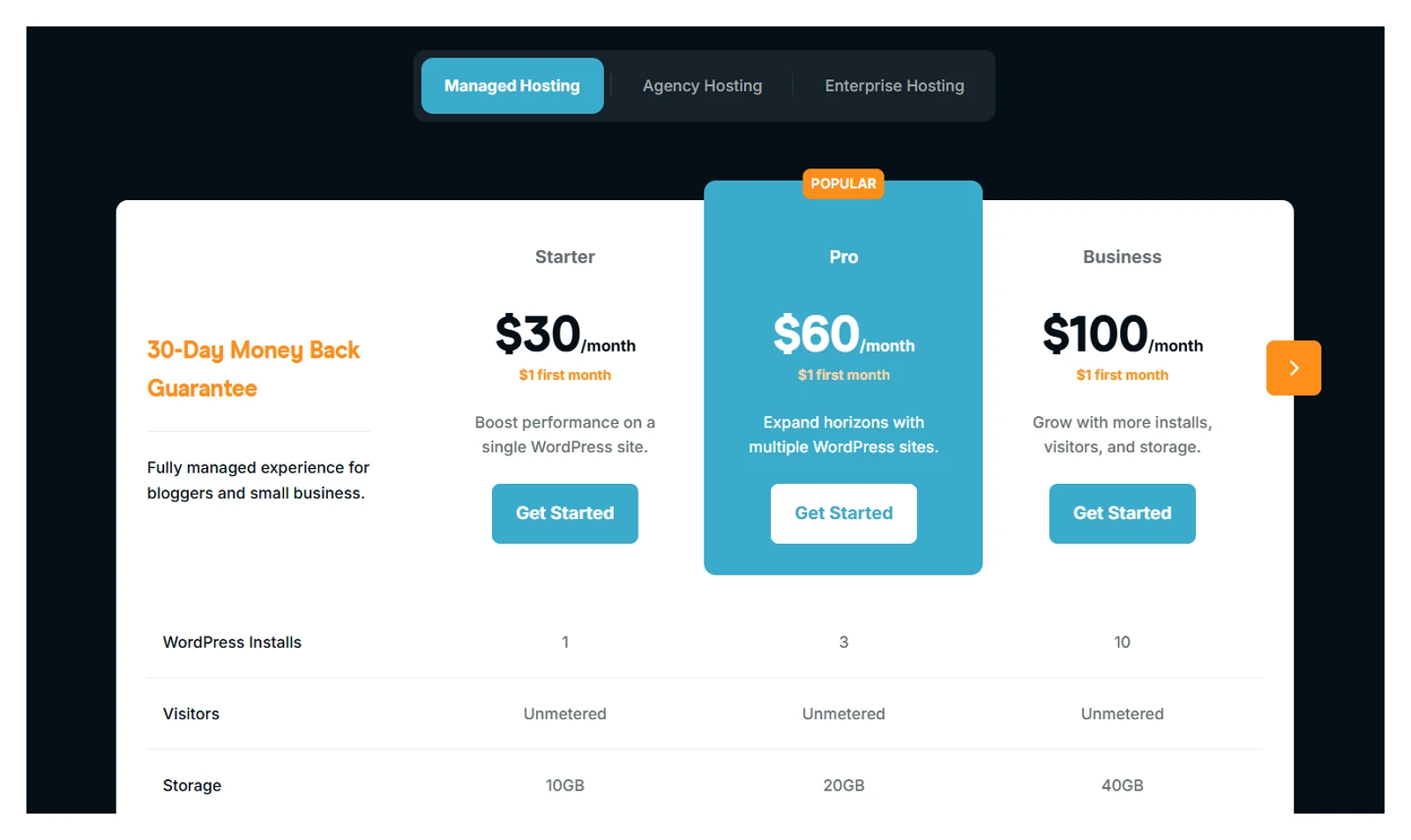
- Starter: $30/month (1 site, 10GB storage)
- Pro: $60/month (3 sites, 20GB storage)
- Business: $100/month (10 sites, 40GB storage)
So, due to the high starting price, Rocket.net isn’t a good option for beginners. But, it can be a great fit for high traffic sites that need reliable hosting with lightning-fast load times anywhere in the world.
4. Antihost (Best for Small Agencies Managing Multiple WordPress Sites)
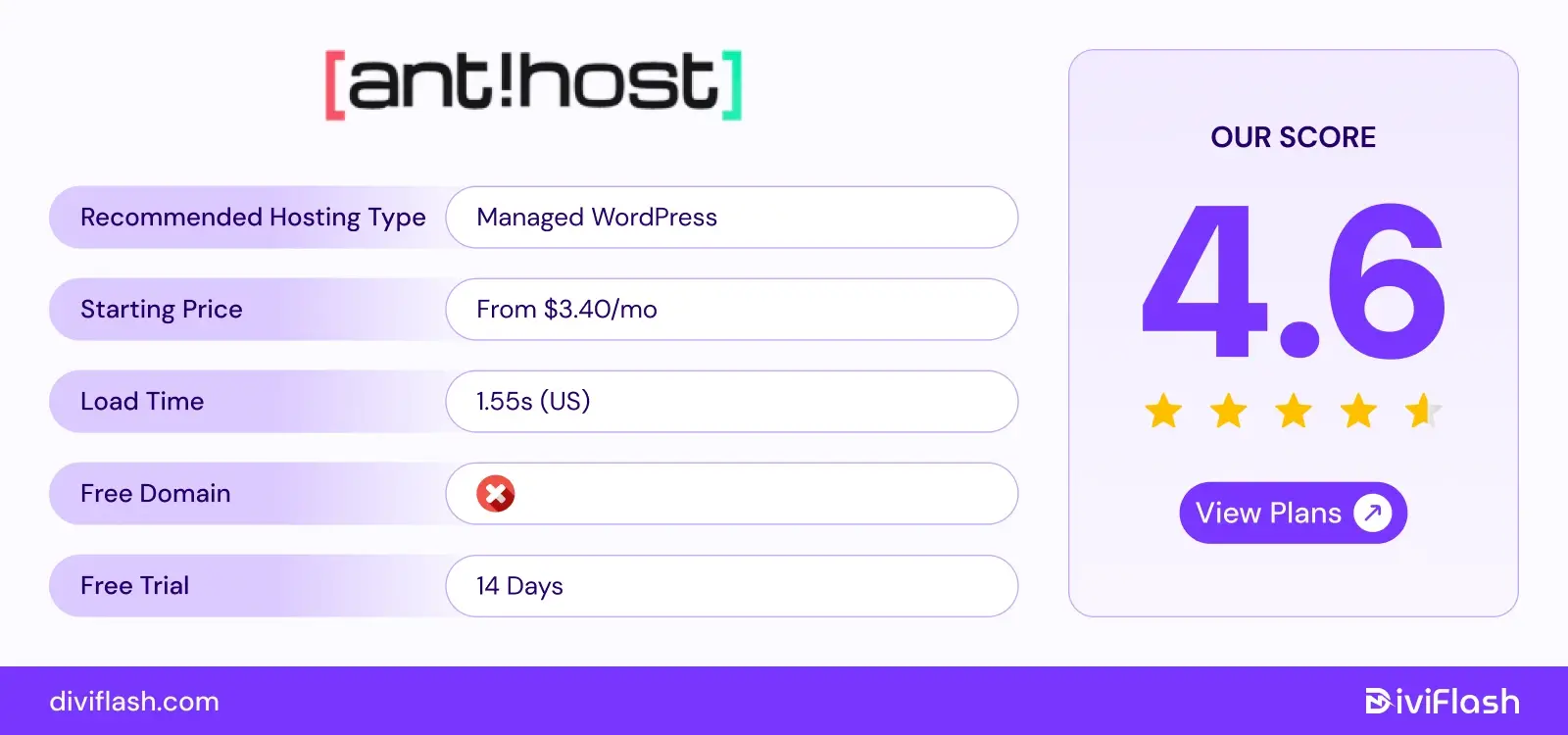
Antihost is a managed WordPress hosting provider designed for businesses and agencies that want reliable performance without the hassle of server management.
It runs each WordPress website in an isolated environment with allocated CPU and RAM resources. This helps keep your site running smoothly, even when other websites on the same server experience heavy traffic.
For better performance, Antihost uses NVMe SSD storage, Nginx servers, and built-in caching to improve loading speeds. Higher-tier plans also include Redis object caching, which can help WooCommerce stores and database-heavy websites run more efficiently.
Managing your websites is also easier with free migrations, automatic backups, one-click staging, and SSL certificates. Plus, agencies can manage multiple client websites from one dashboard and request custom hosting setups.
Key Features of Antihost
- Isolated Hosting Resources: Each WordPress site runs with allocated CPU and RAM resources, reducing performance issues caused by other websites.
- Fast Server Infrastructure: Uses NVMe SSD storage, Nginx, optimized PHP, and server-level caching to help WordPress sites load faster.
- Global Hosting Regions: Offers instant deployment in the US East and Germany, with additional locations available on request.
- Staging and Backups: Includes one-click staging, automatic backups, and manual restore options to help you test changes and protect your website.
- Free Website Migration: Helps move existing WordPress websites without extra migration charges. Higher plans also include DevOps assistance for complex migrations.
- WordPress Management Tools: Includes an AI website builder, WooCommerce support, team access, and a centralized dashboard for managing websites.
What We Like the Most
- All plans include a 14-day free trial with no upfront payment.
- The Agency plan supports unlimited websites, making it ideal for managing multiple client projects.
- You can request custom server locations and hosting setups based on your needs.
What Could Be Better
- Instant deployment is limited to the US East and Germany. Other locations require a custom request.
- The entry-level plan offers only 5 GB storage and 20 GB bandwidth, with Redis caching available only on higher plans.
Pricing of Antihost
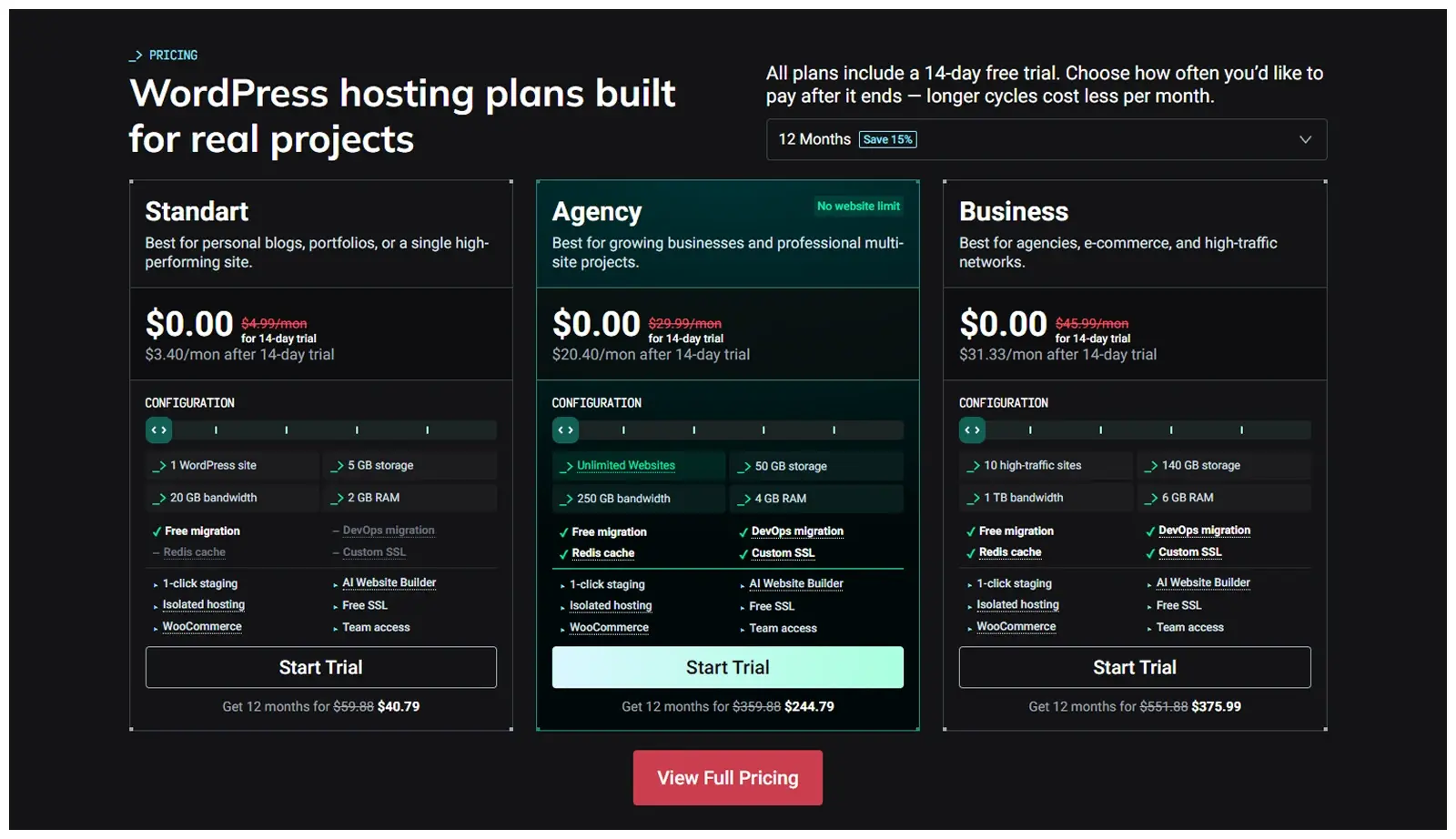
- Standart: $3.40/month (1 website, 5 GB storage)
- Agency: $20.40/month (Unlimited websites, 50 GB storage)
- Business: $31.33/month (10 high-traffic websites, 140 GB storage)
These prices are based on annual billing, and all plans include a 14-day free trial.
5. WPX (Best Managed WordPress Hosting for Speed and Dedicated Support)
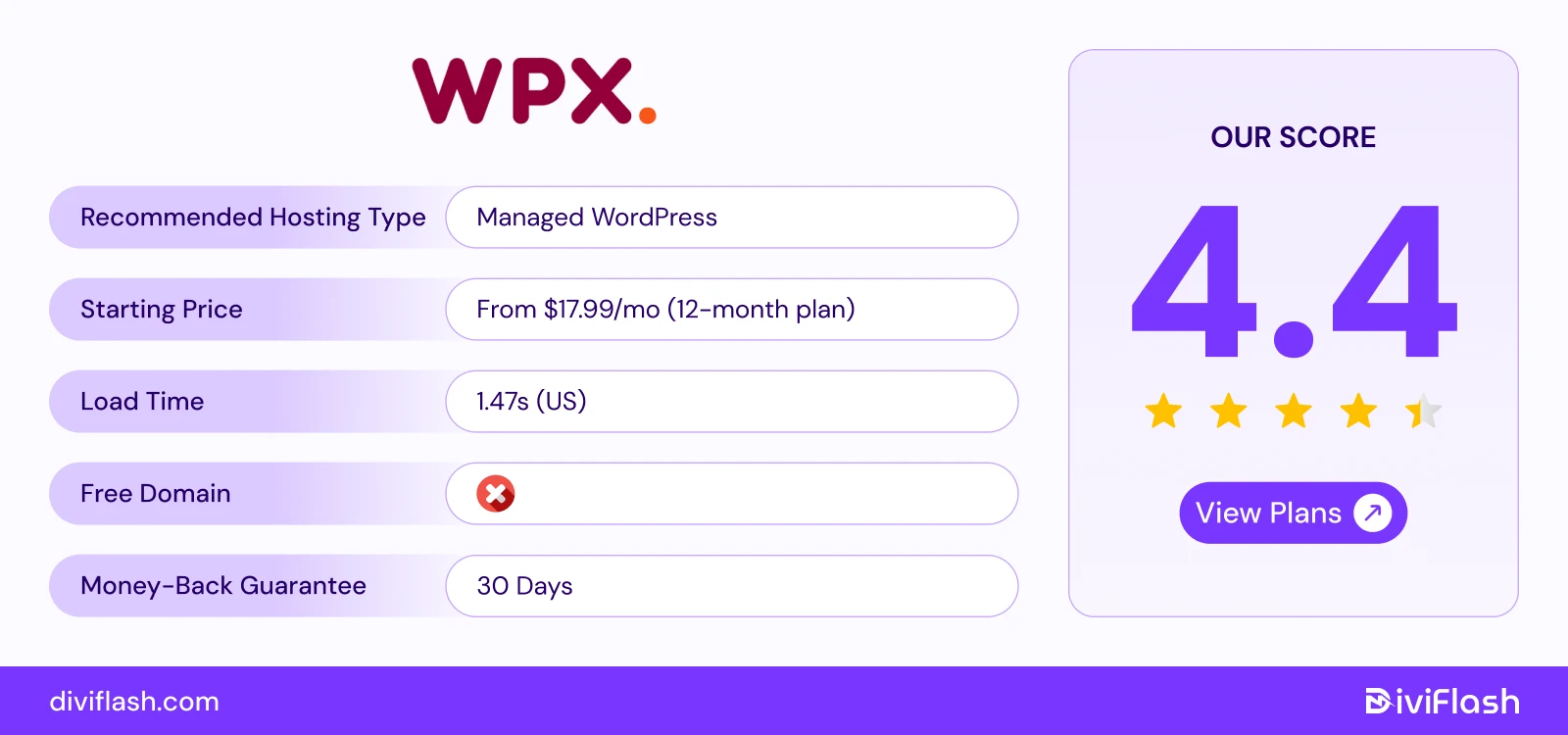
WPX Hosting is designed for WordPress users who prioritize high performance, reliability, and premium support.
WPX offers its own in-house CDN called WPX XDN (eXceptional Delivery Network) for free with all hosting plans. With this, it provides faster content delivery and drastically reduces page load times using 40+ global endpoints.
For users managing multiple websites, WPX is one of the most flexible and efficient options. Even its entry-level plans support multiple WordPress sites with the maximum uptime and speed. This makes it a perfect choice for digital agencies or content heavy blogging sites with several projects.
Again, WPX runs dedicated high-spec SSD servers (not shared or virtualized clusters) for its all plans. So your site’ll get its own isolated environment for maximum stability.
Where WPX truly excels is its customer service. Their “Fixed For You” guarantee means if your site faces downtime, security issues, or plugin conflicts, WPX’s support team will personally fix it for free.
Key Features of WPX
- Global data center and XDN: WPX has 3 main data centers in Chicago, Sydney, and London. But with 41+ global XDN points, your site still loads fast with around 99.95% uptime worldwide from the nearest location.
- Dedicated Server Resources: Every WPX site runs on SSD servers with dedicated RAM and CPU allocations. So, there’ll be no noisy neighbor issues like shared hosting.
- Strong Security and Malware Protection: WPX scans for malware daily and cleans it for free. It includes brute-force and Sucuri protection, a Web Application Firewall, and hybrid DDoS protection to keep your site safe.
- Free Daily Backups: Automatic back up every day and stored securely for 28 days. You can restore your site anytime with just one click.
- Free Business Email Accounts: Create up to 50 custom email addresses for your domain. These can be used with Gmail or Outlook for easy professional communication.
What We Like the Most
- WPX gives you unlimited email inboxes, which most managed hosts like Cloudways or Nestify don’t offer. Even you can set how much storage each inbox gets based on your needs.
- You can also ask the WPX team to speed up your website right from your dashboard. They’ll manually adjust everything for the best performance and load times.
- Their live chat response time averages under 30 seconds, and migrations are handled by experts at no extra cost.
What Could Be Better
- WPX doesn’t offer auto resource scaling options like cloudways. Again, compared to its price and other performance features, this limits the scale of large traffic sites or businesses.
- It also lacks SSH and Git access. So, it’ll not be a good choice for developers who prefer advanced control and version management.
Price of Managed WPX for WordPress
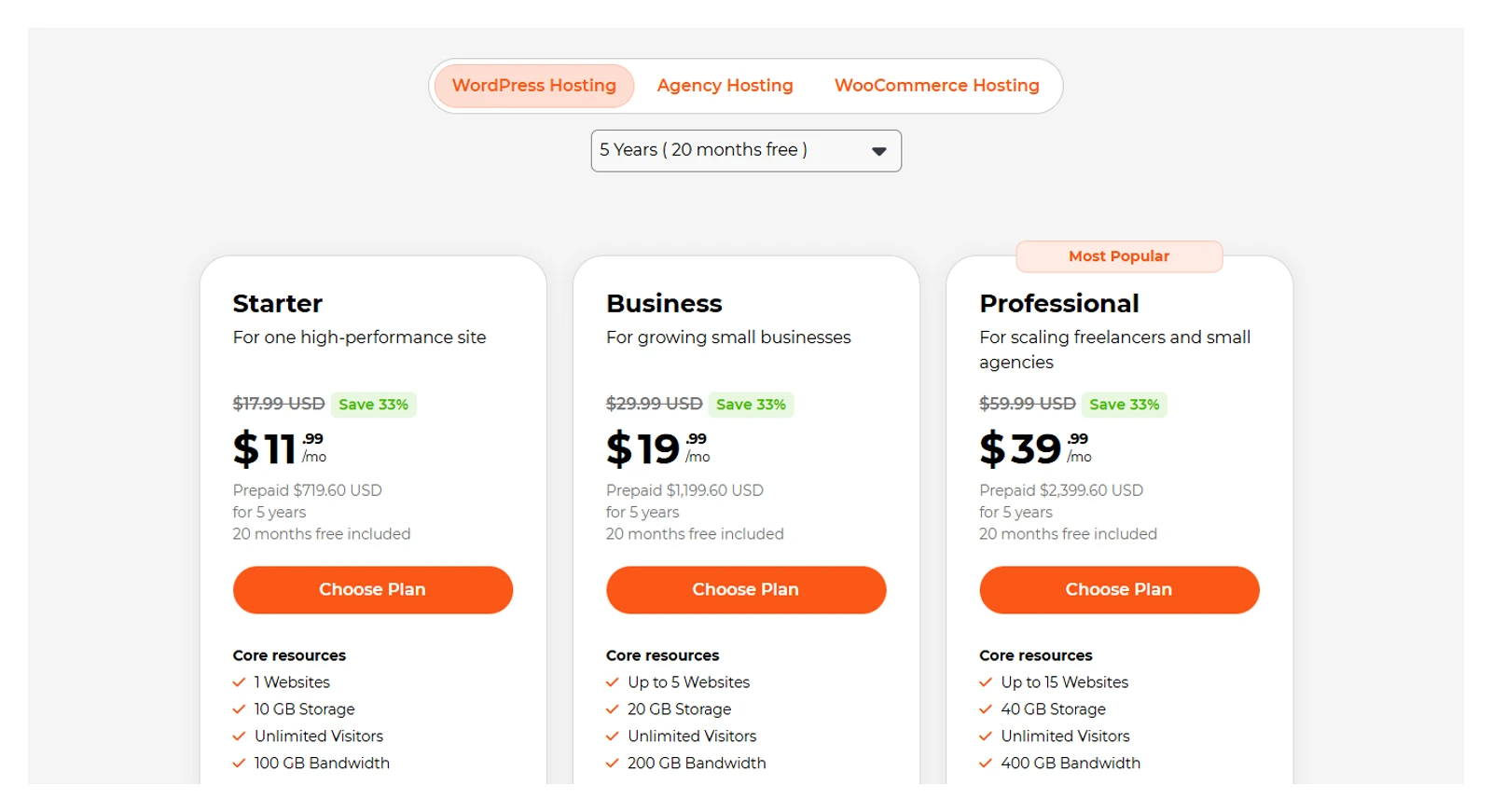
- Business: $20.83/month (5 websites, 15GB storage)
- Professional Plan: $41.58/month (15 websites, 30GB storage)
- Elite Plan: $83.25/month (35 websites, 60GB storage)
So, if you’re running high end WordPress blogs or business websites and mostly need top-tier performance, world-class support, WPX is a great hosting option.
6. DreamHost (Best Managed hosting for Performance & Long Term Value)
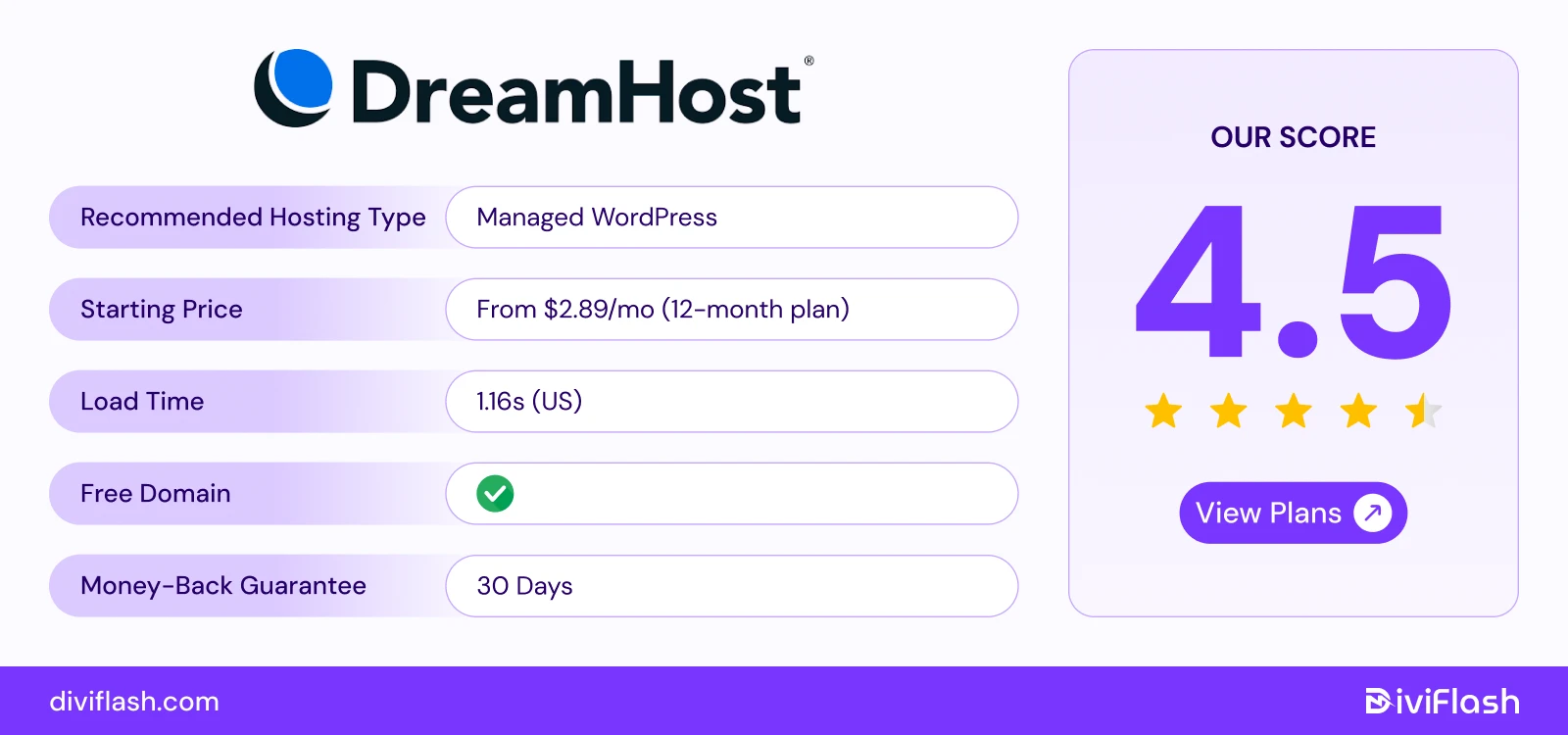
DreamHost is one of the few officially recommended WordPress hosts by WordPress.org itself. With over two decades in the industry, DreamHost has built a reputation for control simplicity, affordability, and long-term reliability.
Rather than using cPanel, DreamHost offers a custom control panel designed especially for beginners to easily manage WordPress sites. And, with its 100% uptime guarantee, you’ll get almost zero downtime for your sites.
DreamHost is even more popular for its hands-off maintenance. You get automatic WordPress updates, daily backups, and built-in caching already handled for you.
And if you’re starting from scratch, there’s also an automated website builder option to design a beautiful site even in minutes. Overall, DreamHost is best for users who want long-term dependability without technical headaches.
Key Features of DreamHost
- Global data centers: DreamHost servers are mainly located in the United States. Its data centers are in Ashburn, Virginia, and Hillsboro, Oregon, and its headquarters are in Brea, California.
- Free AI Website Builder: DreamHost includes a free Liftoff AI builder, which helps you design a professional website in minutes. Just answer a few questions, and it creates your site automatically.
- Page Caching and Performance Tools: Built-in page caching improves site speed without needing extra plugins. You can also adjust caching settings to match your site’s needs.
- Web Application Firewall (WAF) Management: DreamHost protects your site with a WAF to block malicious traffic and prevent attacks like SQL injection and cross-site scripting.
- Developer Tools: Offer full control with tools like SSH, WP-CLI, SFTP, and PHP version even on Dreamhost’s shared plans for developers to easily manage and customize.
What We Like the Most
- DreamHost offers the longest money-back guarantee at 97 days, so you can try their hosting risk-free for over three months.
- It also includes many free features in their basic plans compared to other hosting, such as an AI-powered site builder, unlimited emails etc.
- Even without using a CDN, DreamHost keeps your website fast and reliable for all visitors.
What Could Be Better
- DreamHost’s data centers are only in the US, sites may load slower for visitors in other regions.
- DreamHost also doesn’t provide a premium CDN like Cloudways or WPX, which can limit global performance.
Price of Managed DreamHost for WordPress
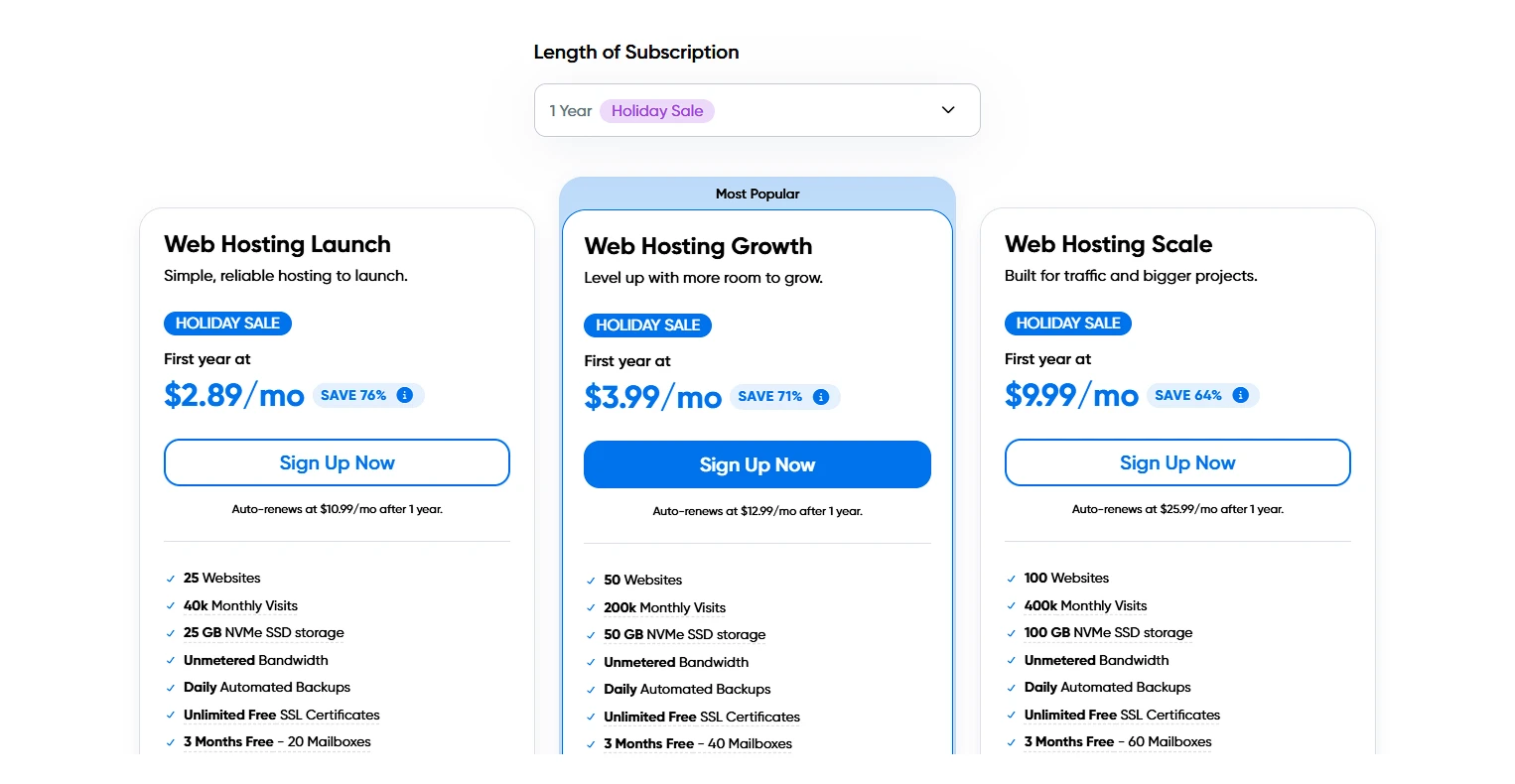
- Launch: Starting at $2.99/month
- Growth: Starting at$3.99/ month
- Scale: Starting at$9.99/month
So, if you’re looking for an affordable, long-term WordPress hosting with many free features, and especially your audience is from the US, then, you can surely consider Dreamhost.
7. Pressable (Best Managed Hosting for Multiple Websites)
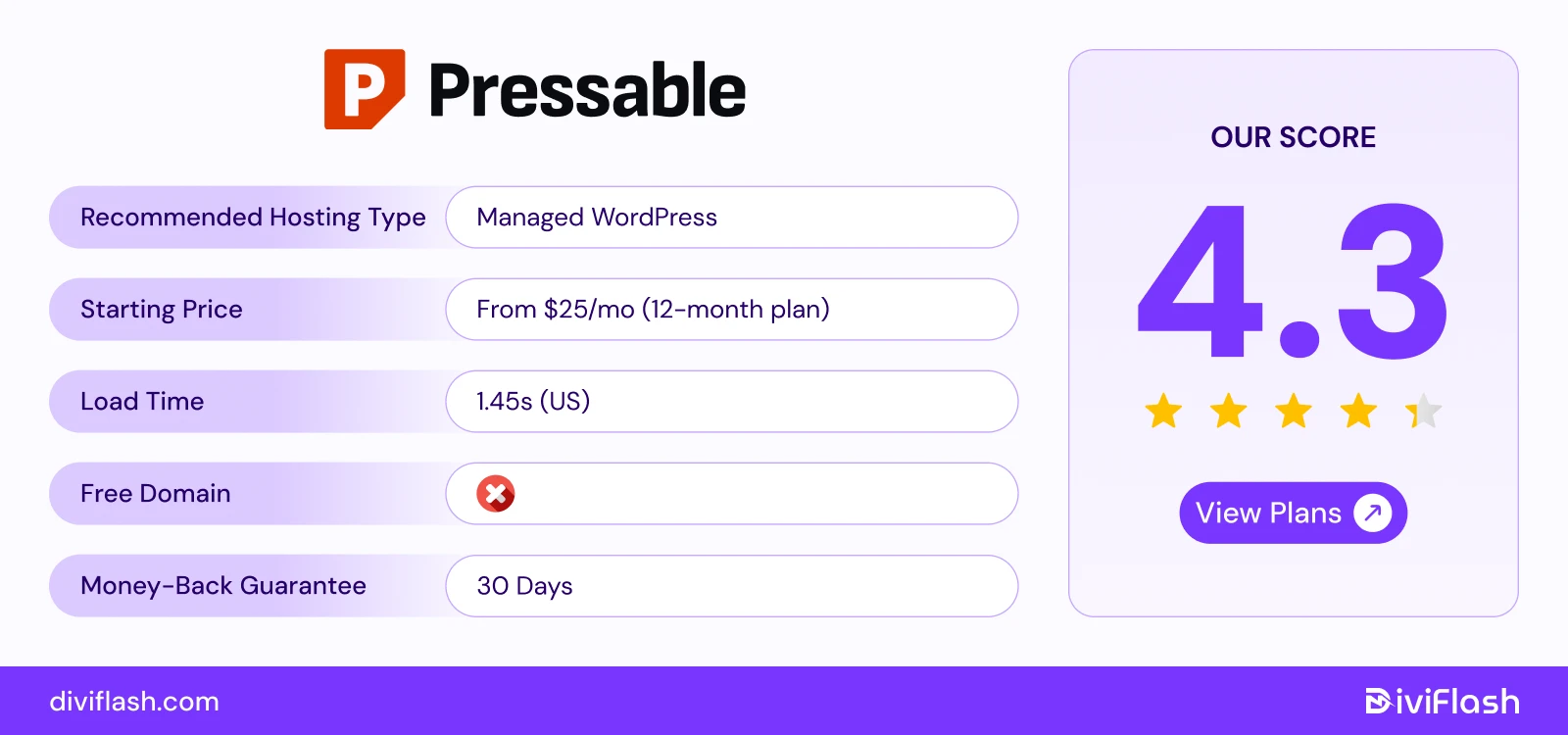
Pressable is a managed WordPress hosting service built by the same team behind WordPress.com and WooCommerce (Automattic). This gives Pressable a big advantage because it’s built and maintained by the people who actually make WordPress.
Pressable is very popular for agencies, WooCommerce stores, and businesses that manage multiple websites.
Each Pressable plan includes Jetpack Security Daily, automatic malware scans, one-click staging, and free site cloning. You create, manage, and monitor all your client websites in one place from its web hosting dashboard.
For WooCommerce users, Pressable offers special optimizations like object caching, data sync, and automatic scaling. So, even during high-traffic sales periods, your store loads fast and automatically stable.
Key Features of Pressable
- Global data centers and CDN: Pressable’s new “PressableEdge” infrastructure operates through four data centers. Again, comes with a built-in CDN and edge caching that greatly boost your website’s loading speed across the world.
- Automattic Cloud Infrastructure: Runs on the same secure and scalable platform powering WordPress.com. You don’t need to set up anything , it works automatically. So, no issue with stability and enterprise-grade 100% uptime.
- Centralized dashboard: The Pressable dashboard works as a central control panel for managing your hosting and WordPress websites. From here, you can handle everything (updates, backups, restores, staging sites, security settings, and performance tools) in one single place.
- Jetpack Security Daily: Includes real-time malware scanning, backups, downtime monitoring, and spam filtering. Your websites are backed up every day, and you can restore them with just one click.
- Developer-Friendly Tools:
Pressable includes everything developers need like WP-CLI, SSH access, Git, and PHP version control by default. Even for seasonal developers, there is a Studio Local tool to manage workflow and increase productivity.
What We Like the Most
- As Pressable is built by Automattic, you get complete integration with the entire WordPress ecosystem.
- The Data Sync feature is another biggest plus. It lets you easily sync data between two Pressable sites. So, even if it's a business site or ecommerce, it is simple to clone or move a site’s content to another domain.
- You can even get a custom hosting plan that fits your agency or business needs simply by consulting with their support team.
What Could Be Better
- Pressable’s pricing is higher priced compared to other managed WordPress hosts, which might not be ideal for small websites or beginners. Even, there is no built-in email hosting.
- It also has a limited number of data centers (currently only four) and also the CDN isn’t that advanced like others. So, it can affect site speed for visitors far from those locations.
Price of Pressable

- Signature 1:$25/month (1 site, 20GB storage, 30K visits)
- Signature 3: $60/month (5 sites, 35GB storage, 75K visits)
Signature 5: $155/month (20 sites, 80GB storage, 400K visits) - Signature 8: $675/month (100 sites, 325GB storage, 2M visits)
So, if you’re running an agency, and want high end core WordPress & WooCommerce performance, then Pressable can be your top pick.
8. Kinsta (Best WordPress Hosting for Large Scale Business)
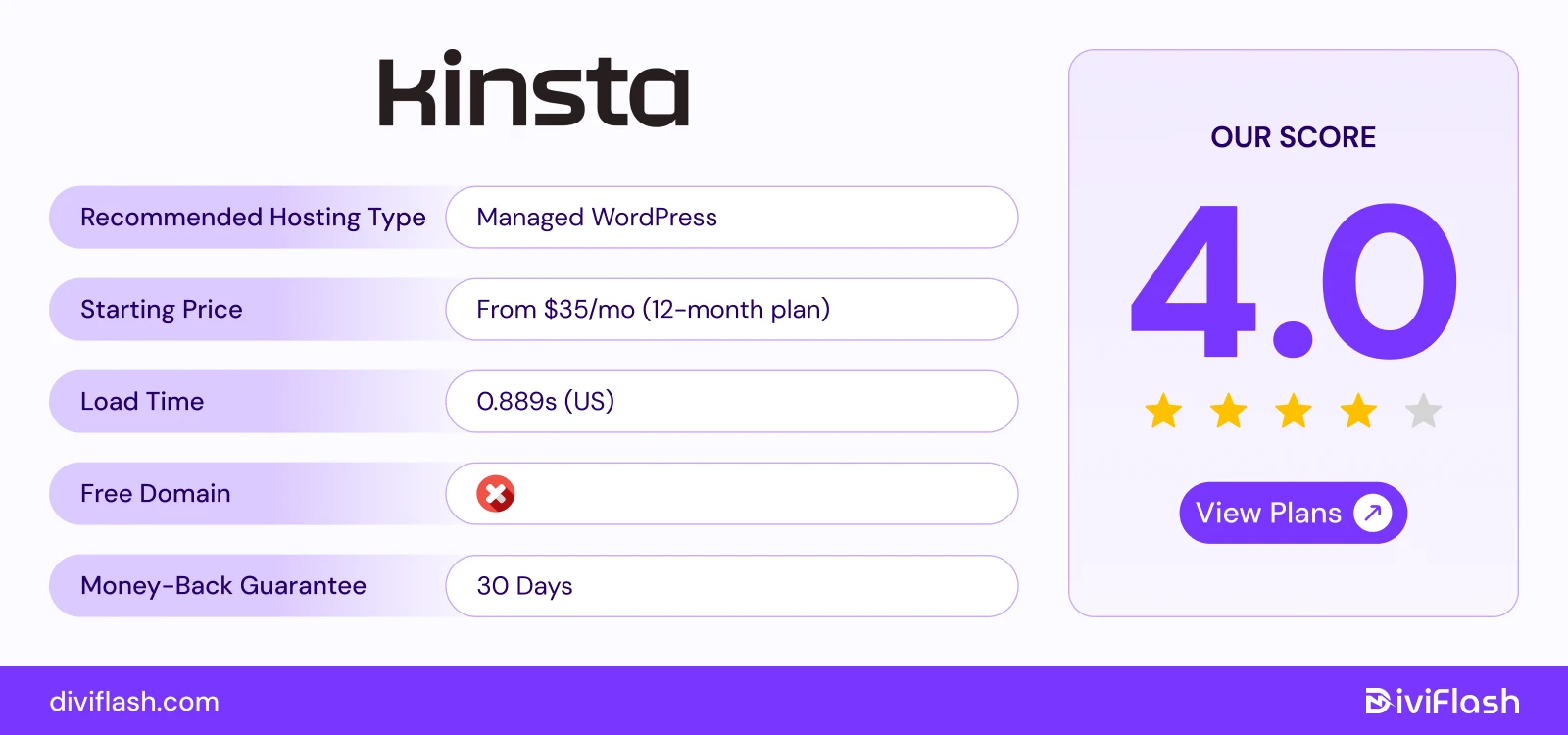
Kinsta is a premium managed WordPress host that runs on Google Cloud’s Premium Tier Network. If you want strong uptime, speed, and support without messing with low-level server details, Kinsta is built for that.
Their MyKinsta dashboard is among the cleanest in the industry. You can manage new sites, set up staging, clone WordPress sites, and check analytics easily all in one place. It also earned the highest “Ease of Admin” rating on G2.
It uses Google Cloud’s infrastructure and global data centers so your site is hosted close to your audience. Because of that, pages tend to load fast, even under traffic spikes.
For eCommerce websites, Kinsta offers dedicated WooCommerce hosting with the flexibility to scale your plan based on traffic needs for busy seasons like holidays or big sales.
It also includes some premium plugins to boost your store’s performance with faster checkout, smoother browsing, and a better shopping experience for your customers.
Key Features of Kinsta:
- Global Data Centers: Kinsta offers 37 data center locations worldwide. So, no matter from where your audience is, they’ll get minimum page load times (around 0.889 s).
High Uptime & Performance Monitoring: Kinsta guarantees 99.9% uptime with Google Cloud’s fastest C2 and C3D, even for business-critical or visitor-heavy sites. It also offers frequent health checks and monitoring to avoid any unknown downtime issue. - Built-in Security & Free SSL: Includes free wildcard SSL via Cloudflare integration, firewall, DDoS protection, malware scanning, edge caching to keep your site secure without extra plugins.
- Developer Tools & Staging: Kinsta supports SSH, Git, WP-CLI, version of PHP control, and staging sites for developers to test and deploy the changes safely. Even, it has a dedicated hosting called “DevKinsta” mainly for developers or agencies.
- Multi-User Dashboard: Kinsta lets you add multiple users with different roles and access levels. This makes team collaboration easy for agencies, developers, and clients working on the same projects.
What We Like the Most
- It’s own built-in APM (Application Performance Monitoring) tool to track your website’s real-time performance. It checks slow queries, plugins, or scripts that affect speed and provides insights to fix them quickly.
- You’ll get different hosting plans for agencies, eCommerce stores, enterprises, and even non-profit businesses. Each plan includes special tools and benefits designed for their specific needs.
- You also get flexible backup options like daily, weekly, hourly, staging, and even on demand compared to other hosting. You can automate backups or create them manually.
What Could Be Better
- Some entry-level plans have limits on (visitors, PHP workers, or resources). So, the basic plans are only suitable for small businesses.
- It also starts with high prices for small or personal websites. While the performance and support are excellent, the pricing may feel high if you’re just starting or running a low-traffic blog.
Pricing of Kinsta
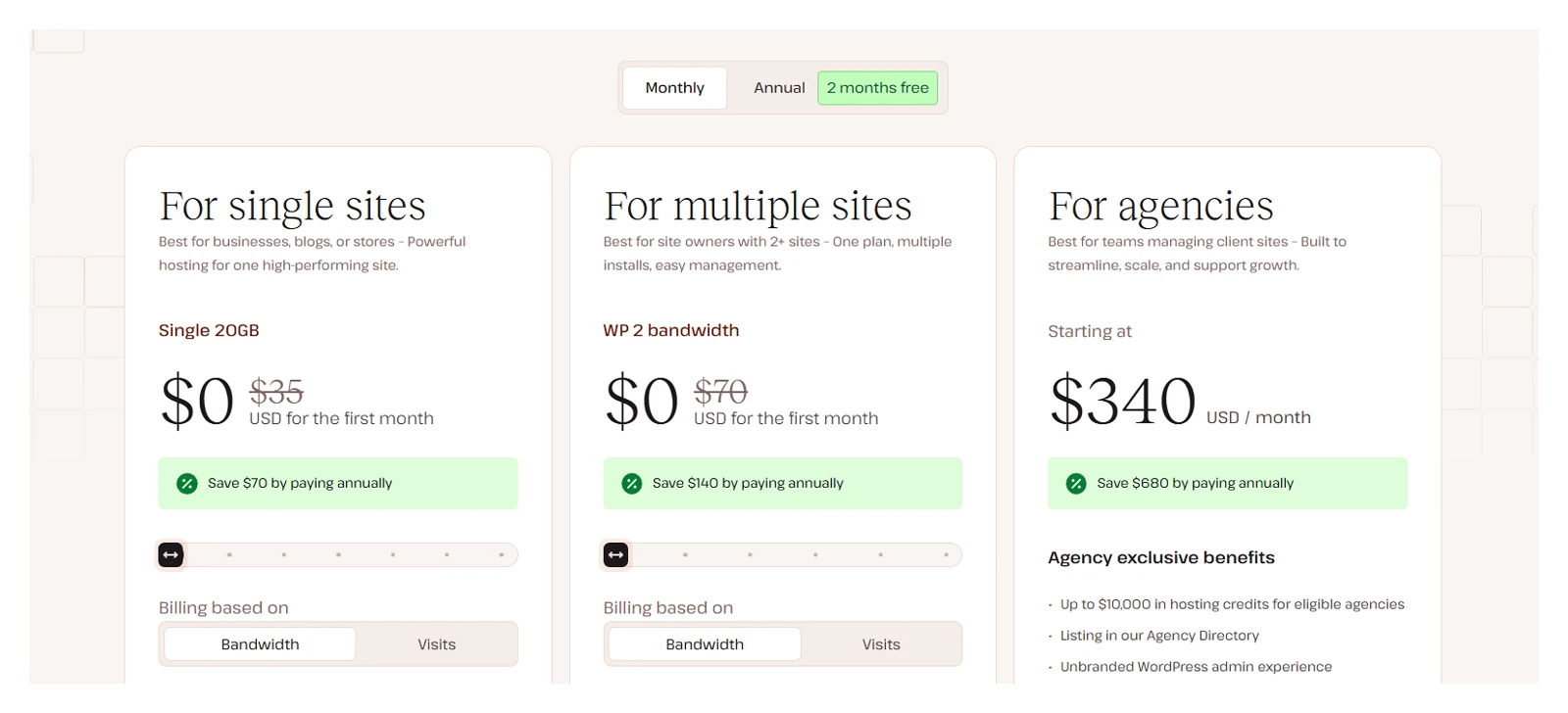
- Single site: $35/month (1 site)
- Multiple sites: $70/month (2 sites)
- Agency: $340/month (60 sites)
So, Kinsta will be a great hosting plan if you want for agencies, SaaS, and developers who need high performance, scalability, and professional-grade tooling.
9. WP Engine (Best Hosting for Performance & Reliability)
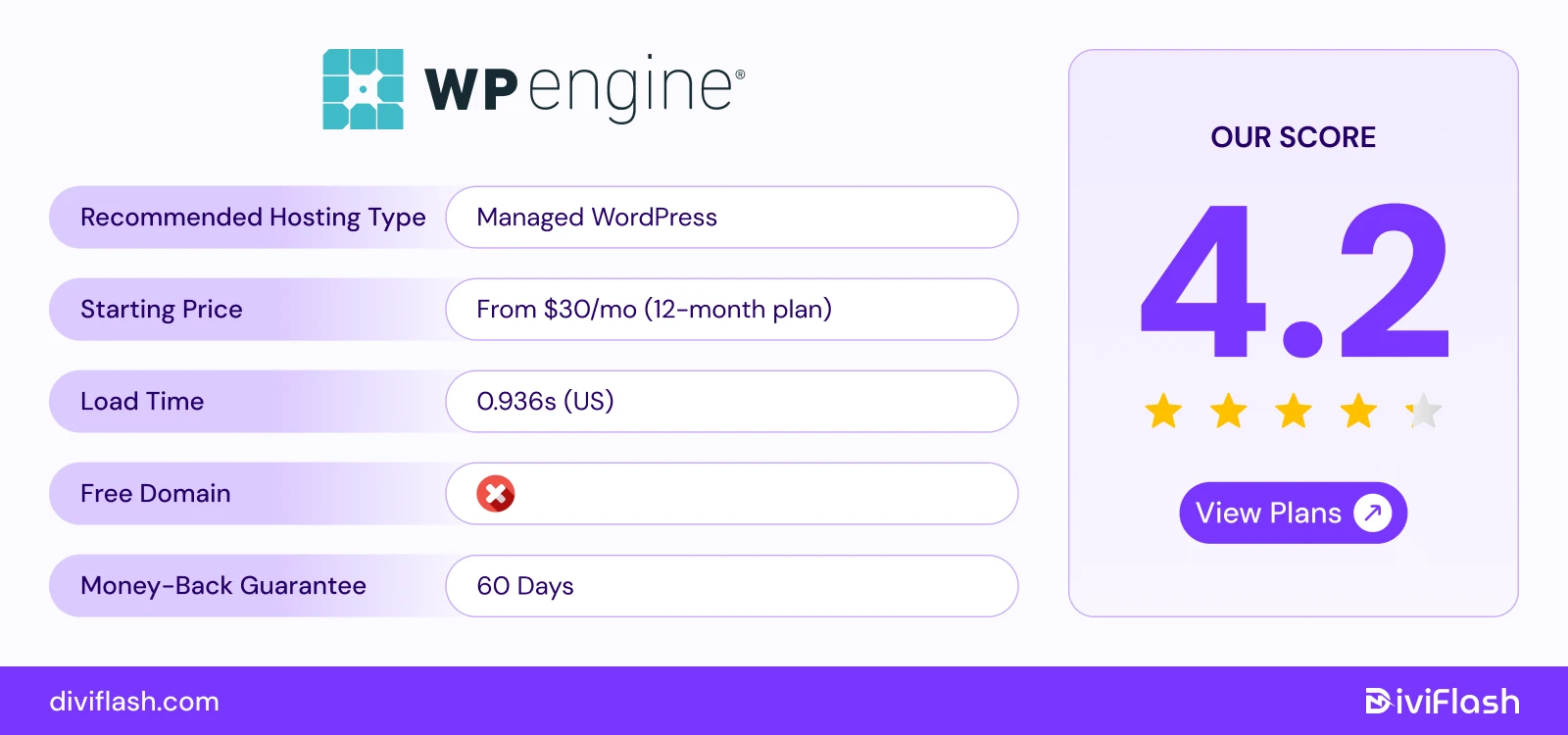
WP Engine is another premium managed WordPress hosting provider utilizing Google Cloud Platform. It focuses on delivering fast, reliable, and secure hosting for WordPress websites of all sizes.
With WP Engine, you get access to a user-friendly dashboard for simple site management especially for beginners. WP Engine’s custom EverCache system and Global Edge Security give your site high end speed and protection.
WP Engine also offers automated WordPress updates, daily backups, and strong security measures including firewalls, plugin monitoring, and multi-factor authentication.
These features are built to make your site management easier and safer. So, you can just focus on your content and business growth rather than technical hassles.
WP Engine also provides Genesis Pro Framework, a premium yet free collection of WordPress themes and tools to enhance your site design without any extra cost.
Key Features of WP Engine
- Global Data Centers: Total 9 global data centers located in the US, Canada, UK, Ireland, Belgium, Germany, Taiwan, Singapore, and Australia. This reduces average loading time (0.936s) for visitors from around the world.
- EverCache & Cloudflare Integration: WP Engine includes a CDN with Cloudflare’s Edge Network. It speeds up your site and compresses images without losing quality for faster page loads.
- Strong Security Measures: Includes advanced site security options with disk write protection, proprietary firewall, plugin monitoring, multi-factor authentication, ISO certification, and Cloudflare Global Edge Security.
- Backups & Management Features: WP Engine offers automatic WordPress updates, daily auto backups, and easy restore options for up to 60 days. These features make site management simple and reduce the risk of errors or data loss.
- Developer Tools: SSH, Git, WP-CLI, and PHP version control and access to their “Faust.js Toolkit" are included for complete control over their sites. Again, WP engine offers a free local development tool “Local by Flywheel” to test and make safe changes.
What We Like the Most
- WP Engine gives 39+ StudioPress themes and the Genesis framework for free. This makes it easy to build a professional website even for beginners.
- The AI-Powered Knowledge Base. You can quickly find answers and solve issues without waiting for manual support.
- Unlike many hosts that support multiple platforms like Magento alongside WordPress, WP Engine focuses entirely on WordPress. This ensures faster speed, better features, and dedicated support for all WordPress sites.
What Could Be Better
- Some security features, like the web application firewall and DDoS protection, are only available as paid add-ons.
- WP Engine also limits the number of websites on basic plans. So, if you want to manage multiple sites, it can be restrictive.
Pricing of WP Engine
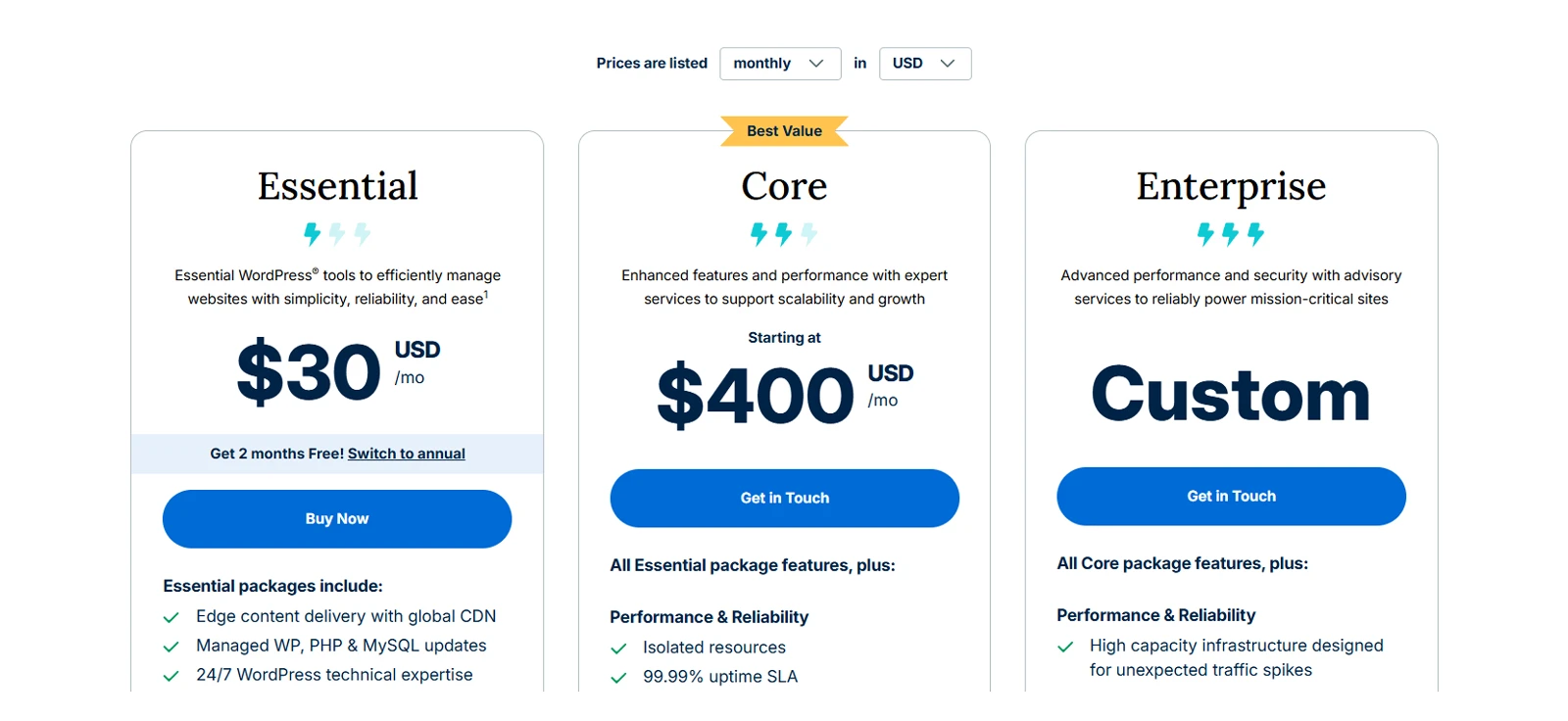
- Startup: $30/month (1 site, 10GB storage, 25K visits)
- Growth: $115/month (10 sites, 20GB storage, 100K visits)
- Scale: $290/month (30 sites, 50GB storage, 400K visits)
So, if you want hassle free hosting with strong security and high performance dedicatedly for WordPress, WP engine is the one.
10. Liquid Web (Best VPS Hosting for Scalable Businesses with Automated Features)
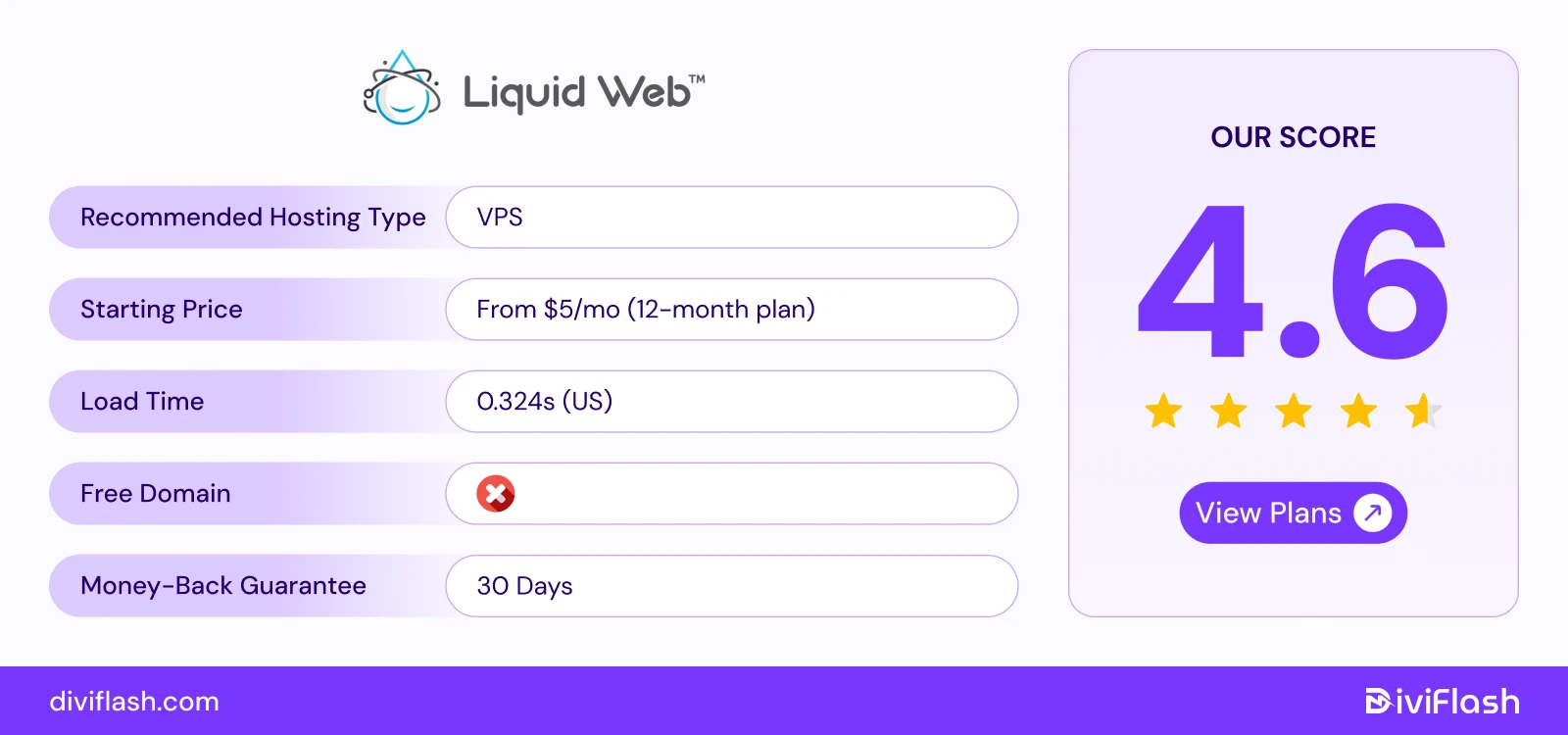
Liquid Web is well-known for its powerful managed VPS and dedicated hosting solutions. It’s built to handle business websites, web apps, and online stores that need reliable performance and support.
Their hosting is fully optimized for popular platforms like WordPress, WooCommerce, and business email. You don’t have to worry about setup or maintenance, everything is already managed for you.
Liquid Web mainly stands out for making maximum web management work automated. It automates your site’s resources scaling, backups, and even monitors your site performance without any manual inspection.
Again, its AI Side Hustle Starter Kit is mainly built for entrepreneurs or large businesses to launch a side hassle using AI.
They’ve also introduced a managed WooCommerce hosting service. It’s designed for large, resource-heavy online stores. So, you just do your business while they take care of all the performance and technical side.
Key Features of Liquid Web
- Global Data Centers: Liquid Web runs on a strong infrastructure with 18 global data centers located in places like Lansing, Phoenix, and Amsterdam and so on. This ensures faster load times, low latency, and consistent uptime for visitors from any region.
- Multiple Control Panel Options: You can choose between cPanel, Plesk, or InterWorx depending on your needs. This flexibility helps you manage your websites easily, no matter your hosting experience level.
- Managed WordPress & WooCommerce Hosting (via Nexcess): Liquid Web offers managed WordPress and WooCommerce hosting through its sister company- Nexcess. You get built-in custom-built server clusters, caching, staging, and automatic scaling, which make your site faster and easier to manage under heavy traffic.
- Automatic Plugin Updates & Virus Detection: Liquid Web doesn’t just update your WordPress core, it also automatically updates all the plugins. Again, its “Threat Stack and Server Security Plus” add-on auto detects viruses, malware and removes them.
- Developer-Friendly Tools: Developers get advanced tools like SSH, Git, and WP-CLI for full control. Each plan includes free SSL, daily backups, Cloudflare CDN, root access, and DDoS protection for both security and flexibility.
What We Like the Most
- Every plan comes with free email hosting, so you can create professional business emails without paying extra or using third-party services.
- Liquid Web has one of the highest customer ratings in the hosting industry, with a leading NPS score of 66. They have extensive customer support via live chat,mail, and even phone calls.
- You can manage all your WordPress sites from one dashboard using iThemes Sync Pro. It tracks your site’s uptime, Google Analytics, and SEO data and notify you.
What Could Be Better
- Liquid Web doesn’t offer shared hosting, which might not suit beginners or small sites.
- Their plans cost more than standard managed hosting providers. However, the extra cost comes with premium performance and top-tier support.
Pricing of Liquid Web hosting
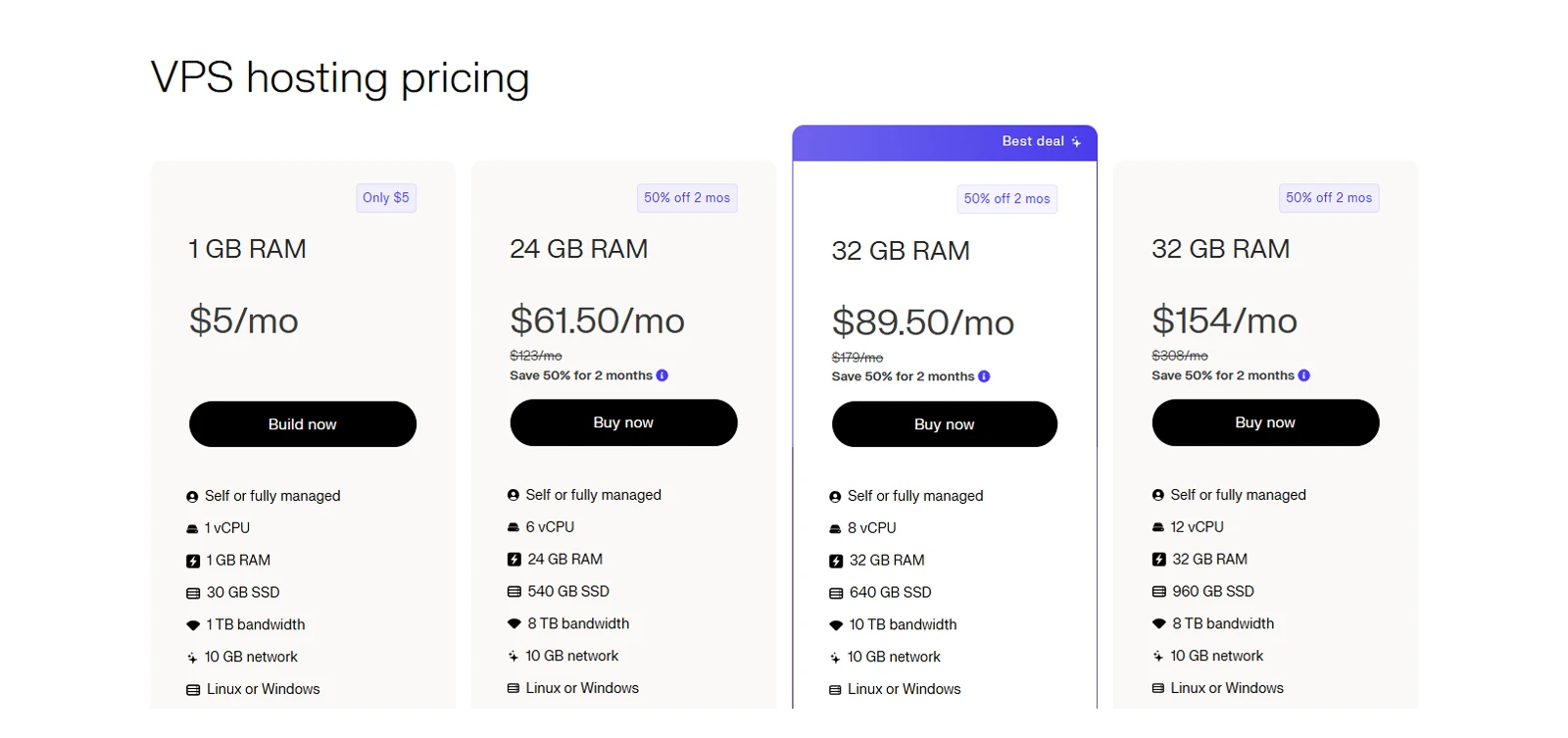
- Spark Launch: $5/month (1 site, 15GB storage)
- Spark Thrive: $10/month (1 site, 15GB storage)
- Spark Elevate: $20/month (1 site, 15GB storage)
So, if you want high performance with advanced WordPress control rather than cheaper options, then Liquid web has all you want.
11. SiteGround (Best WordPress Hosting for Bloggers, Agency)
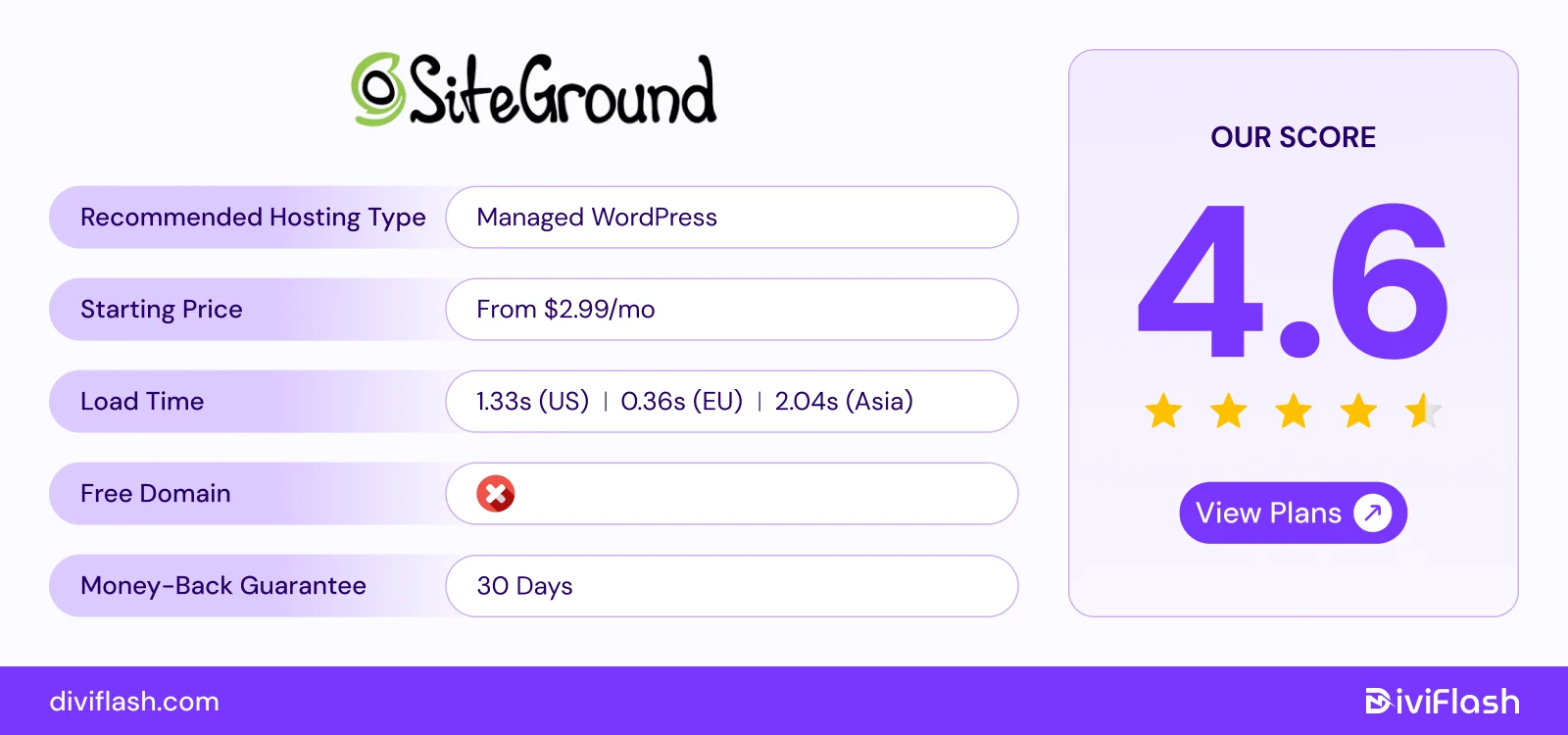
SiteGround is another popular managed WordPress hosting provider that is officially recommended by WordPress.org. It’s known for fast performance, reliable uptime, and excellent customer support.
If you’re running a small business, blog, or WooCommerce store, SiteGround is a great choice because it handles all the technical work for you.
Their custom Site Tools panel replaces traditional cPanel with a clean, beginner-friendly interface. SiteGround comes with WordPress pre-installed, automatically updated, and the SG Optimizer plugin for caching and image compression.
With free email, CDN, and 24/7 support, SiteGround remains one of the best-balanced hosts for all beginner user types.
Key Features of SiteGround
- Server Location Choice: You can choose from 11 server locations, including the US, UK, Netherlands, Germany, Spain, France, Singapore, and Australia. This loads your website faster with 99.9% uptime for visitors to their region.
- Google Cloud Infrastructure: SiteGround uses Google Cloud’s fast and secure network for all its hosting. This ensures top reliability, speed, and low downtime for your website.
- Free Daily Backups: Your website is backed up automatically every day and stored for 30 days. Again, you get free SSL, daily malware scans, and AI-based threat prevention to keep your site safe.
- In-house Speed Solutions: The GrowBig and GoGeek plans use a special Ultrafast PHP setup that reduces load time and memory use. You’ll also get a custom MySQL setup that makes database-heavy websites like WooCommerce or membership sites load much faster.
- SuperCacher and SG Optimizer: SuperCacher uses three layers of caching to make your site load lightning-fast and reduce server strain. The SG Optimizer plugin lets you manage caching, image compression, and speed settings directly from your WordPress dashboard.
What We Like the Most
- SiteGround lets you add multiple users to manage your websites. This is perfect for teams or agencies that handle several projects together.
- SiteGround offers 11 data centers, but they are distributed across America, Asia, Australia and Europe rather than one specific region. So, you can easily choose the nearest hosting server to get the maximum performance.
- SiteGround’s support team is fast, friendly, and available around the clock through chat or ticket. Their WordPress expertise stands out compared to most competitors.
What Could Be Better
- SiteGround charges around €30 if you want their team to handle your website migration. The free migrator plugin works well, but full service isn’t included.
- Each SiteGround plan limits database size to 1 GB, which is usually enough for small and medium websites but not for larger ones.
Pricing of Siteground
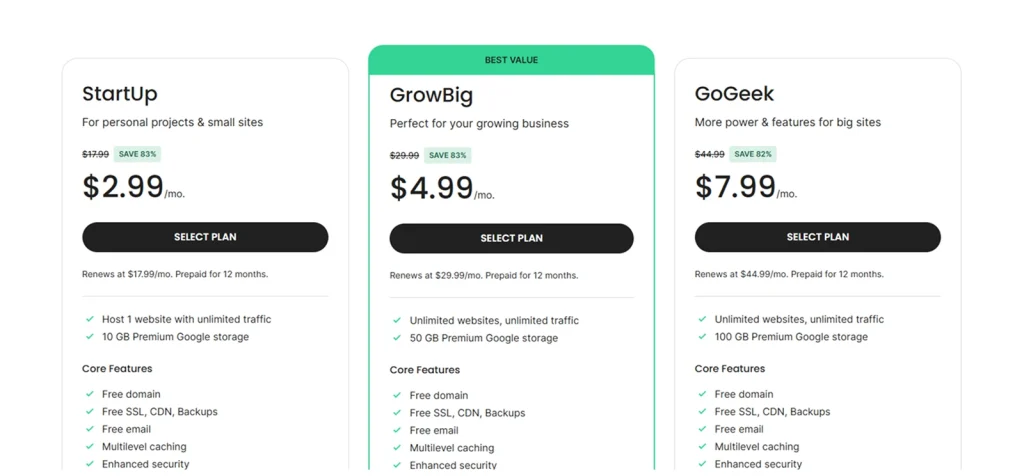
- StartUp: $3.99/month (1 website, 10GB storage)
- GrowBig: $6.69/month (unlimited sites, 20GB storage)
- GoGeek: $10.69/month (unlimited sites, 40GB storage)
So, Siteground is the top consideration for bloggers, small businesses, who want balanced performance, simplicity, and security.
12. Flywheel (Best WordPress Hosting for Freelancers or Designers)
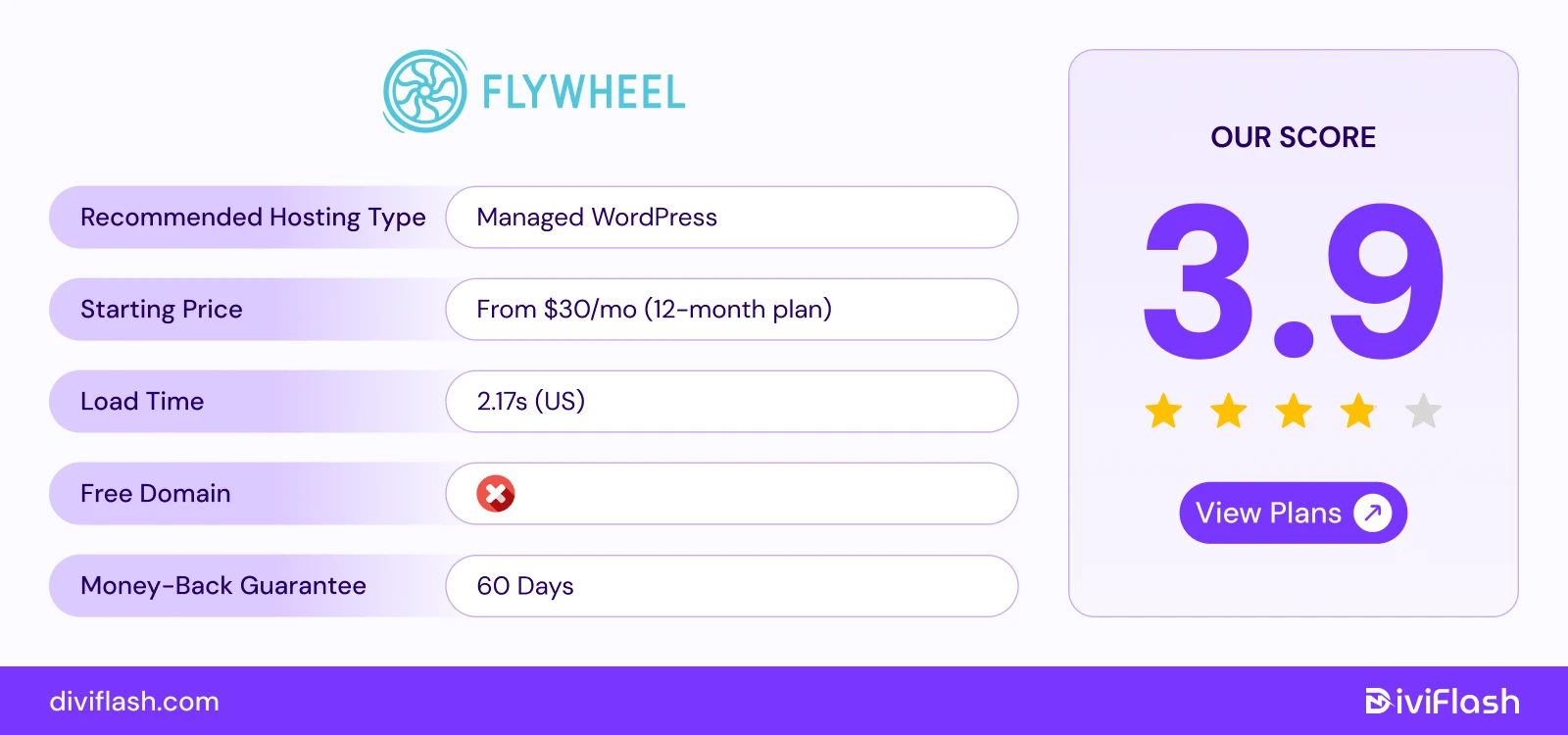
Flywheel is a managed WordPress hosting platform built specifically for freelancers, designers, and agencies. It’s known for its beautiful dashboard, client management tools, and smooth collaboration features.
FlyWheel is owned by WP engine, so it offers all the technical power of WP Engine’s infrastructure but with a more advanced UX.
You can save custom themes and plugins as Blueprints to reuse for future projects. Again, it offers a free Local development app for one click staging and syncing from desktop to live.
Fly Wheel uses Google Cloud server to keep your sites run fast, secure, and scalable. Plus, features like free staging, backups, and automatic caching make your workflow simpler and more efficient.
Key Features of Flywheel
- Global Data Centers: You can choose from seven data centers across the US, Canada, UK, Europe, and Australia. This helps your site load faster by hosting it closer to your visitors.
- Collaborator Access: Flywheel lets you easily add or remove collaborators on any site. It’s perfect for teams or agencies working together on multiple client projects.
- Nightly Backups: Your site is backed up automatically every night and stored for 30 days. You can restore any version with just one click if something goes wrong.
- All-in-One SFTP: Manage all your sites using a single SFTP login instead of multiple ones. It saves time and makes managing multiple websites much easier.
- Performance Tools (FlyCache + CDN): Flywheel includes FlyCache and a built-in CDN (Fastly) to improve speed and performance. This ensures your pages load quickly for visitors around the world.
What We Like the Most
- You can build a website and easily transfer billing and ownership to your client. This is perfect for freelancers or small agencies.
- The control panel is simple, modern, and designed for creative professionals who don’t want technical clutter.
- You can create demo websites to show clients your work before going live.
What Could Be Better
- The plans are more expensive compared to basic shared hosts, which may not suit small personal sites.
- Flywheel doesn’t provide built-in email hosting; you’ll need to use third-party tools like Google Workspace.
Pricing of FlyWheel
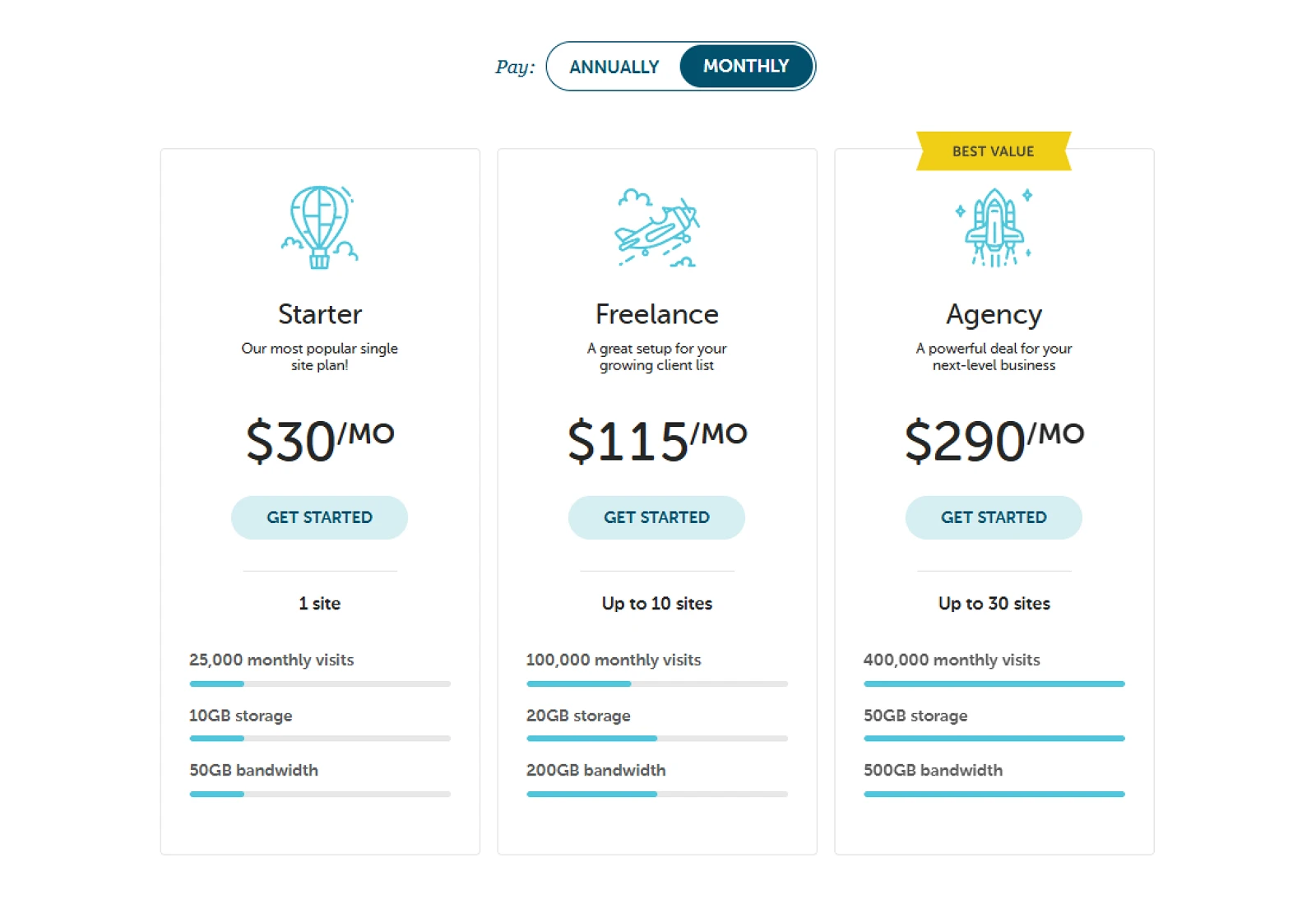
- Starter: $30/month (1 site, 10GB storage)
- Freelancer: $115/month (10 site, 20GB storage)
- Agency: $290/month (30 site, 50GB storage)
So, if you run agencies and want a hosting plan with simple yet advanced WordPress design with workflow automation regardless of price, then you can consider FlyWheel.
13. Hosting.com (Cheapest Entry level Hosting with Advanced Security)
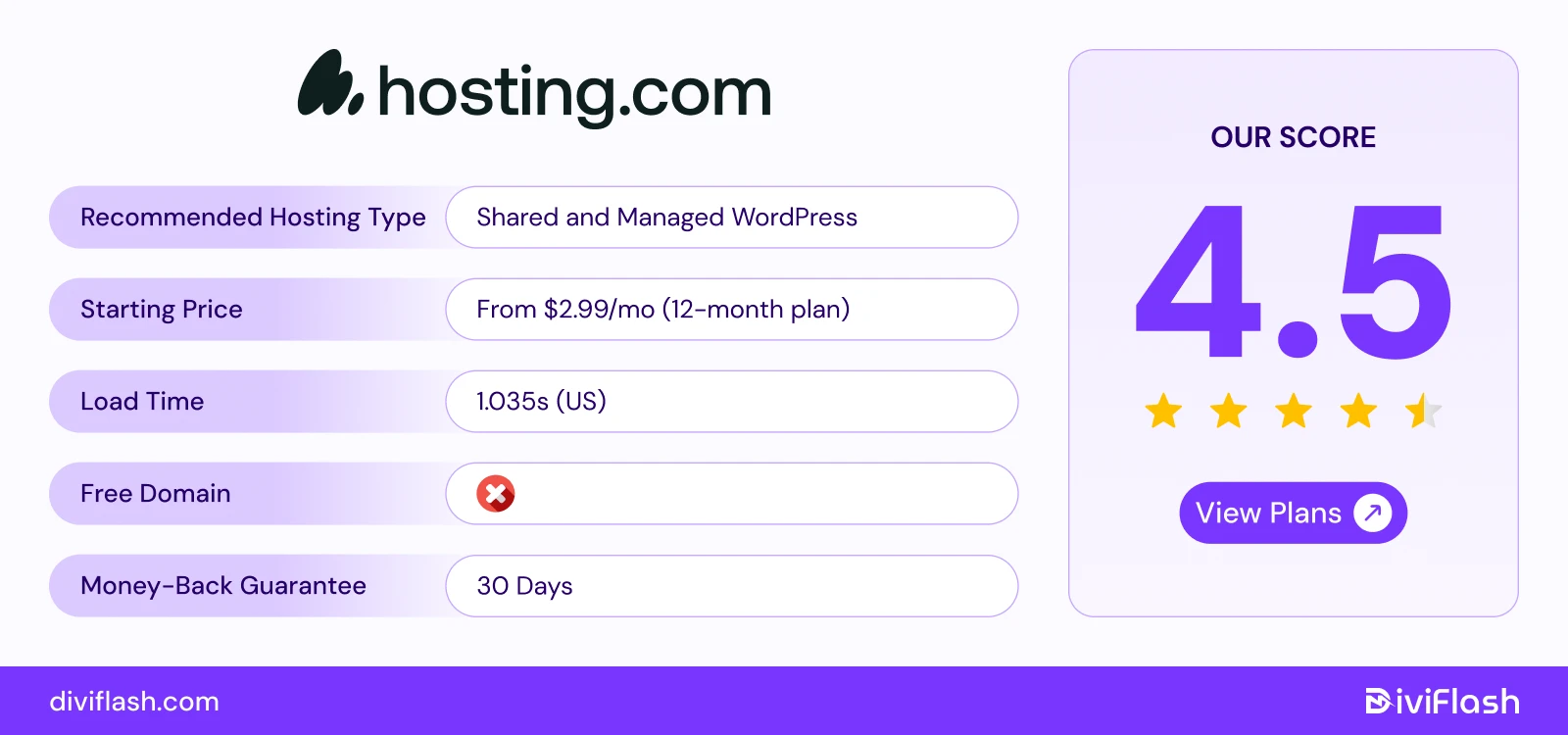
If you’re looking for the cheapest hosting entry, still prioritize website speed, security, and uptime, Hosting.com is designed just for you. Unlike A2 hosting, it focuses on managed, cPanel and shared hosting, which means the company takes care of most technical tasks for you.
Hosting.com is built to make your website load fast. Its optimized servers and WordPress tools help your site run smoothly and respond quickly. This is perfect for business websites that want a better experience for their visitors.
Security and uptime are the main strong points of Hosting.com. Hosting.com protects your website with advanced safety tools and daily backups.
Key Features of Hosting.com
- Global Data Centers: Hosting.com has 9 data centers across the world including the US, Canada, the UK, Germany, India, Singapore, and Australia. So your website can load faster for visitors anywhere.
- Fast performance: The TurboHub control server makes website management easier with faster loading. It comes with drop-in Apache replacement and loads your pages up to 20x times faster than standard hosting.
- Strong Security: Hosting.com keeps your website safe with advanced and constant protection. It includes free HackScan protection, brute force defense, virus scanning, dual firewall, and security monitoring.
- Handles High Traffic: The system automatically adjusts resources during traffic spikes to keep your website running smoothly. Even, all of its plans come with free SSD storage to boost your site’s performance.
- Automatic Optimization and Backups: Hosting.com comes with pre-installed tools that speed up your website and optimize images for better performance. It also creates daily backups and stores them safely in multiple locations, so your data is always protected and easy to restore if needed.
What we like the most
- Hosting.com stands out with its anytime money-back guarantee. Besides the standard 30-day refund, you can also get a partial refund for any unused time after that period.
- It also comes with pre-installed performance tools that help you fine-tune your WordPress site and keep it running smoothly without needing extra setup.
- Plus, you get unlimited bandwidth on all shared plans, so your site can handle as many visitors as it needs without slowing down.
What could be better
- You can only host one website per WordPress plan, it will not be a good fit if you’re managing multiple sites.
- Also, Hosting.com currently doesn’t offer cloud or dedicated server plans, which could be a drawback for businesses looking to scale further.
Price of Hosting.com
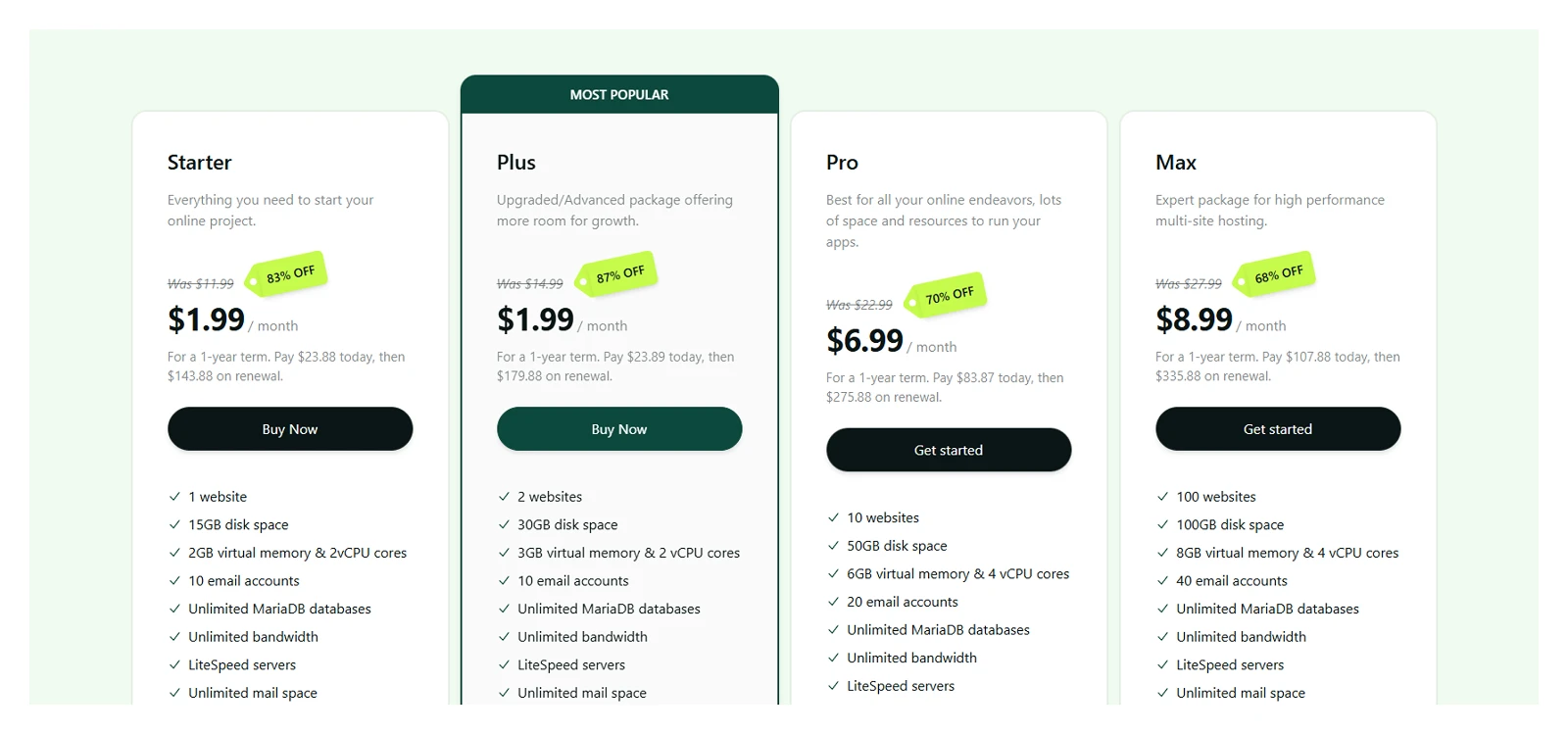
- WordPress: $2.99/month
- Managed: starting at $1/month (only for 1st month)
- VPS: $9.99/month
So, hosting is the right choice for a budget friendly option with high end speed and security.
14. GreenGeeks (Best Eco-Friendly WordPress Hosting for Personal sites)
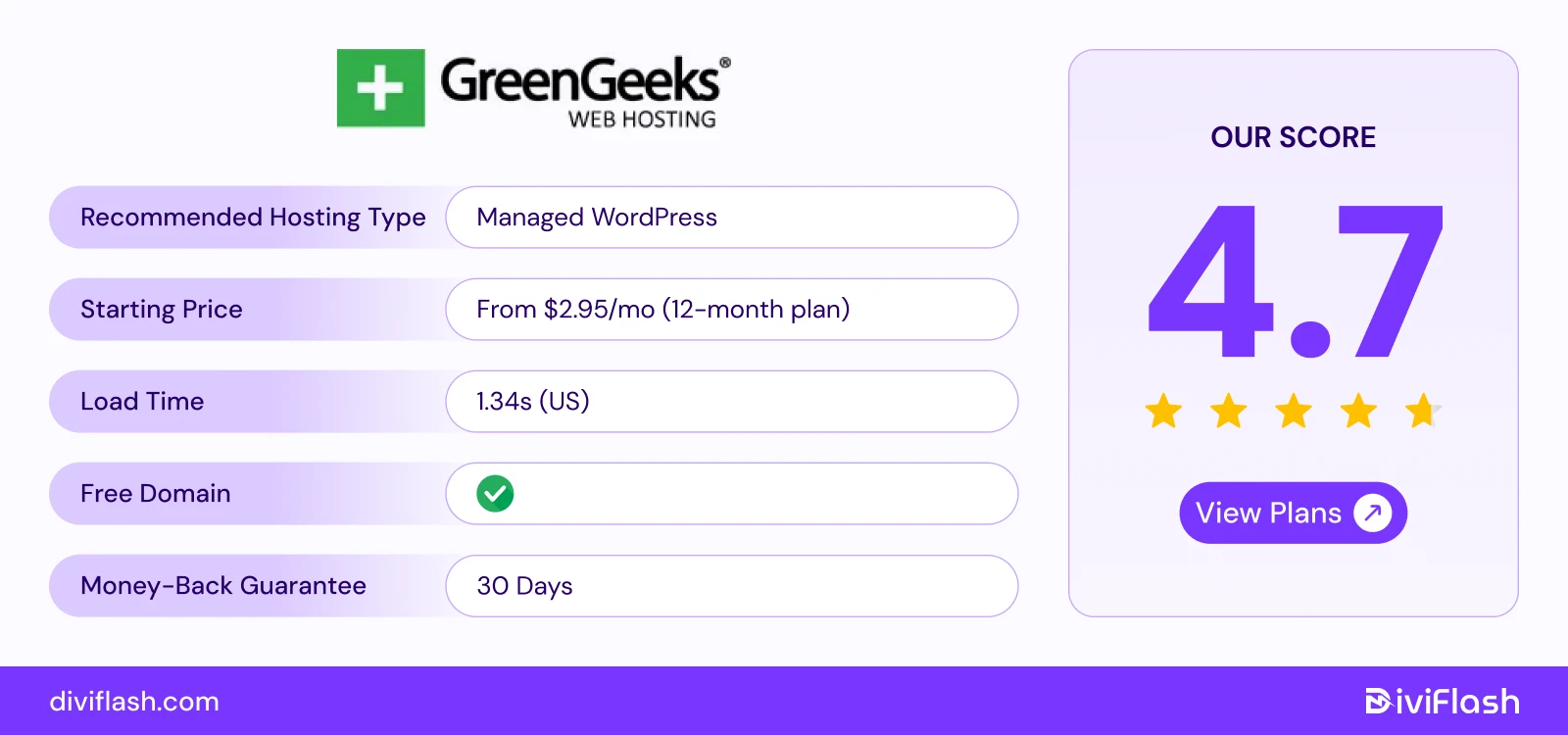
GreenGeeks stands out for its strong commitment to the environment. It returns 300% of its energy use back to the grid as renewable energy. This means, for every unit of power consumed, GreenGeeks purchases three times that amount in wind energy.
Beyond its eco-friendly mission, GreenGeeks also offers fast, secure, and WordPress-optimized hosting. GreenGeeks can automatically check and fix core WordPress files, optimize databases, and resolve performance issues to run your site without consistent manual update.
Again, each plan includes great value with unlimited data transfer and strong security features.
So,if you want your website to run smoothly while supporting a cleaner planet, GreenGeeks is a smart and responsible choice.
Key Features of GreenGeeks
- Global Data Centers & Uptime: GreenGeeks has servers in 5 locations including the U.S., Canada, and the Netherlands with uptime close to 99.99%.
- Speed Optimization: Built on LiteSpeed servers, NVMe SSDs, and free CDN integration, GreenGeeks delivers fast page load times.
- Caching System: Custom caching (LSCache) and automatic updates make your WordPress site perform smoothly worldwide. It automatically updates cached pages when you make changes to your content.
- Adjustable Spam Detection: Lets you set spam filtering levels from 1 to 5. This gives you control over which emails reach your inbox while keeping unwanted messages out.
- Advanced Firewall Protection: GreenGeeks uses an AI-powered firewall to automatically block malware, viruses, and hacking attempts. This keeps your website safe,and protects your data from attacks like DDoS or other malicious activities.
What we like the most
- The basic plans of Greengeeks includes premium features like free emails, unlimited database, multi user access and free built in caching.
- Even, you're a beginner, you can still easily manage this hosting. It handles all plugins and core updates automatically and monitors your site automatically for threats in real time.
- The security features are way more advanced compared to its prices. In fact, other hosting which offers CDN with Cloudflare, advanced spam detection like Rocket. Net charges are quite higher than Greengeeks.
What could be better
- If you choose monthly billing, there’s a $15 setup fee. This fee is waived if you pick an annual plan.
- GreenGeeks is fast, but most of its data centers are located around North America. So, there may be slightly slower loading speed for visitors in regions outside North America.
Price of GreenGeek hosting:
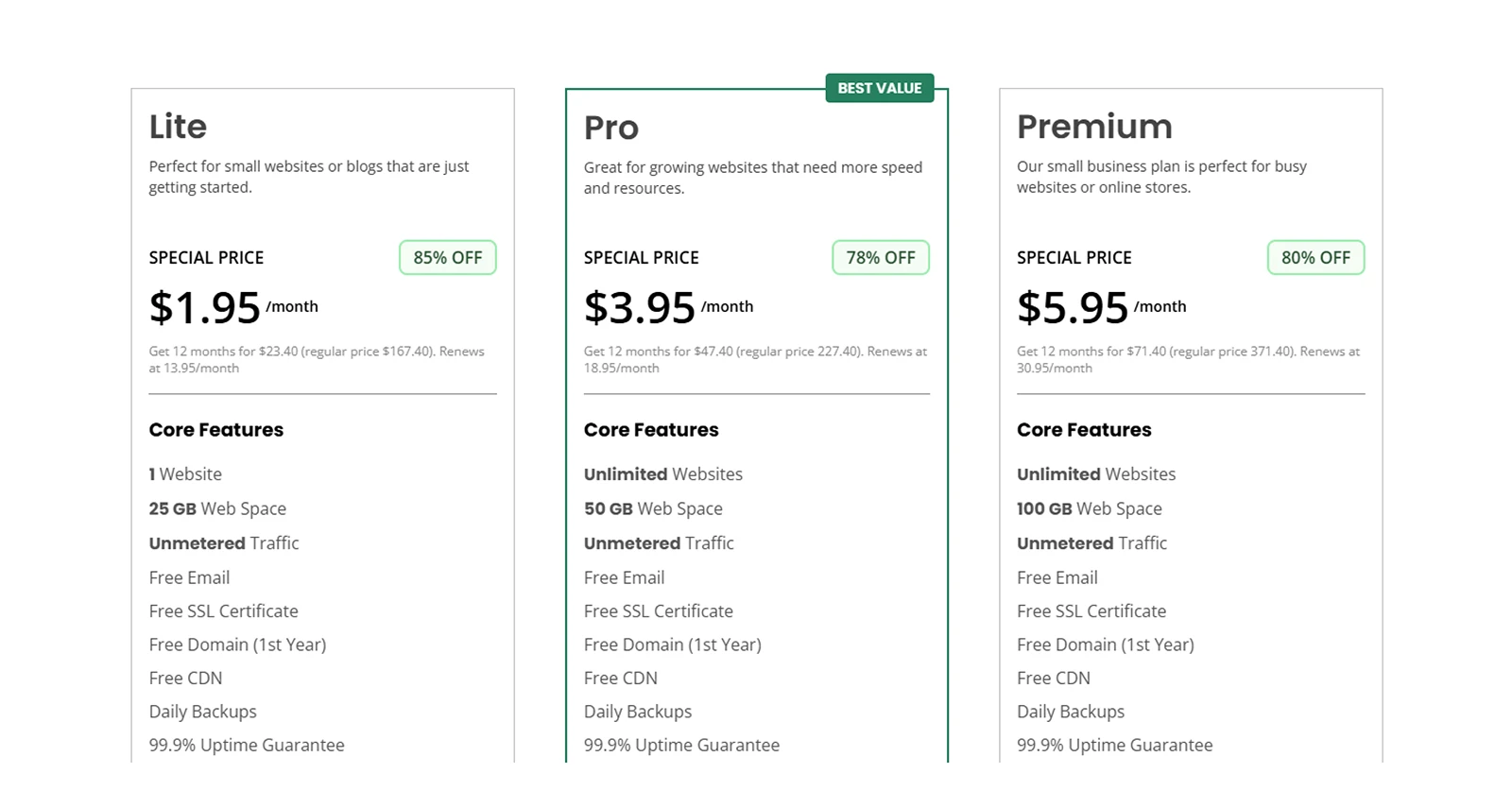
- Shared: Starting at 2.95/month
- Managed VPS: Starting at $69.95/month
- Woocommerce: starting at $2.95/month
So, Greengeek can be a good consideration, if you’re beginners or run small businesses and want a positive impact on the world.
15. InMotion Hosting (Best VPS WordPress Hosting for Developers & Growing Businesses)
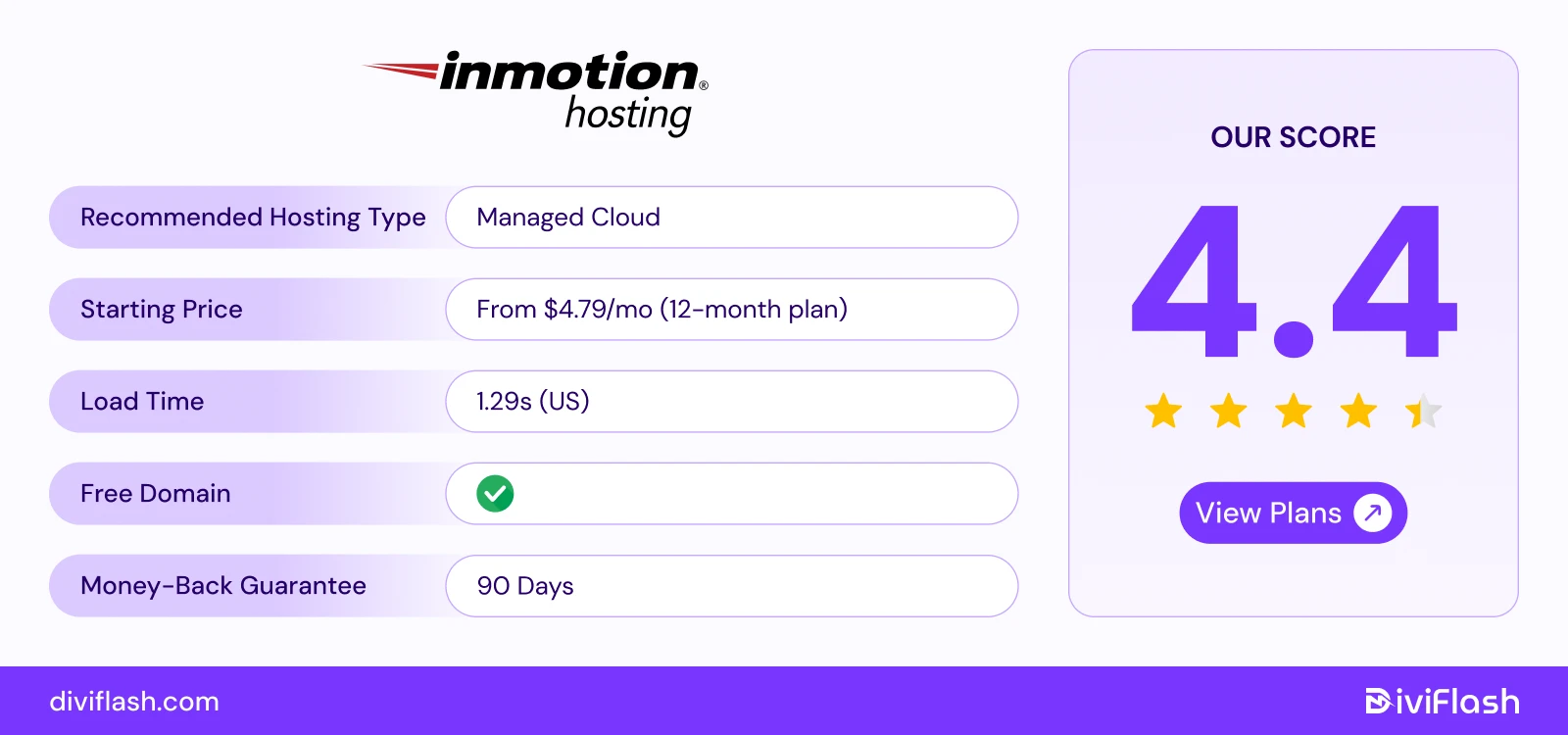
InMotion Hosting is a great choice if you’re looking for powerful and flexible hosting that grows with your business.
With SSD drives, ultra-fast caching, and optimized WordPress environments, it’s an excellent choice for growing businesses, and development teams.
It also includes free SSL, automated daily backups and even WordPress site builder all within a clean AMP (Account Management Panel).
Scalability is another big reason businesses love InMotion. You can start small and smoothly upgrade as your website grows.
Whether it’s handling more visitors, adding new projects, or expanding your online store, InMotion keeps your site running fast and steady at every stage of growth.
Key Features of InMotion Hosting
- Global Data Centers: InMotion Hosting has three data centers including two in the U.S. and one in the Netherlands, which provide consistently low latency and 99.99% uptime in that region.
- Fully Isolated Servers: Each WordPress VPS plan runs on a fully isolated server. This means your website runs smoothly and stays secure without being affected by others.
- Developer-Friendly Tools: InMotion includes tools like SSH access, GIT version control, and WP-CLI. InMotion Hosting uses open-source software and tools, so you can also adjust your server setup the way you like.
- Advanced Security Suite: It comes with strong security features such as DDoS protection, malware scanning, and a custom firewall. These tools help protect your website from common online threats.
- Multi-User Access with Permissions: You can add team members to your account and give each person specific access levels. So, it will be great for working with multiple people in the same project.
What we like the most
- InMotion Hosting gives you one of the longest refund periods like Dreamhost in the industry. You can try their service for 90 days with complete confidence and get your money back if it’s not the right fit.
- You can start small and easily move to a bigger plan when your website needs more power. It’s a smooth process with no downtime or hassle.
- InMotion Hosting offers plans for almost all types of businesses hosting with variable storage and unlimited bandwidth. So, you can choose plans that just align with your needs.
What could be better
- InMotion Hosting only has data centers in the US and Europe. So, if you’re from Asia or other regions, you might notice slightly slower loading times.
- While it’s great for scaling and managing multiple projects, it may feel like more than you need if you’re just starting a simple blog.
Price of Inmotion hosting
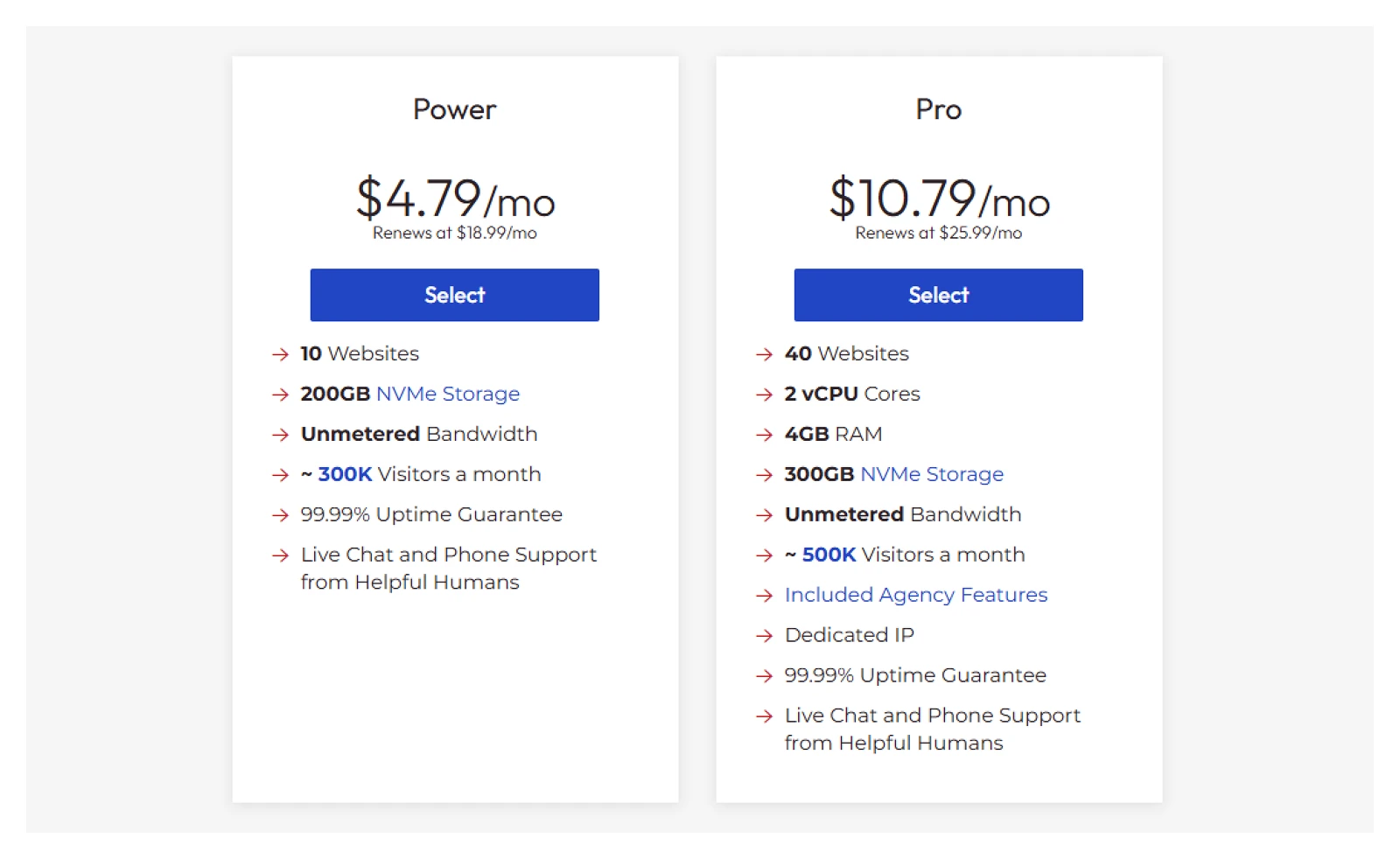
- Shared: Starting at $4.79/month
- Hosting for WordPress: Starting at $5.29/month
- VPS: Starting at $93.49/month
- Dedicated: Starting at $189.98/month
If you’re looking to move beyond simple blogs and start managing multiple or eCommerce sites, InMotion Hosting is a reliable option.
16. Bluehost (Best WordPress Hosting for Ease of Use & Integrated Tools)
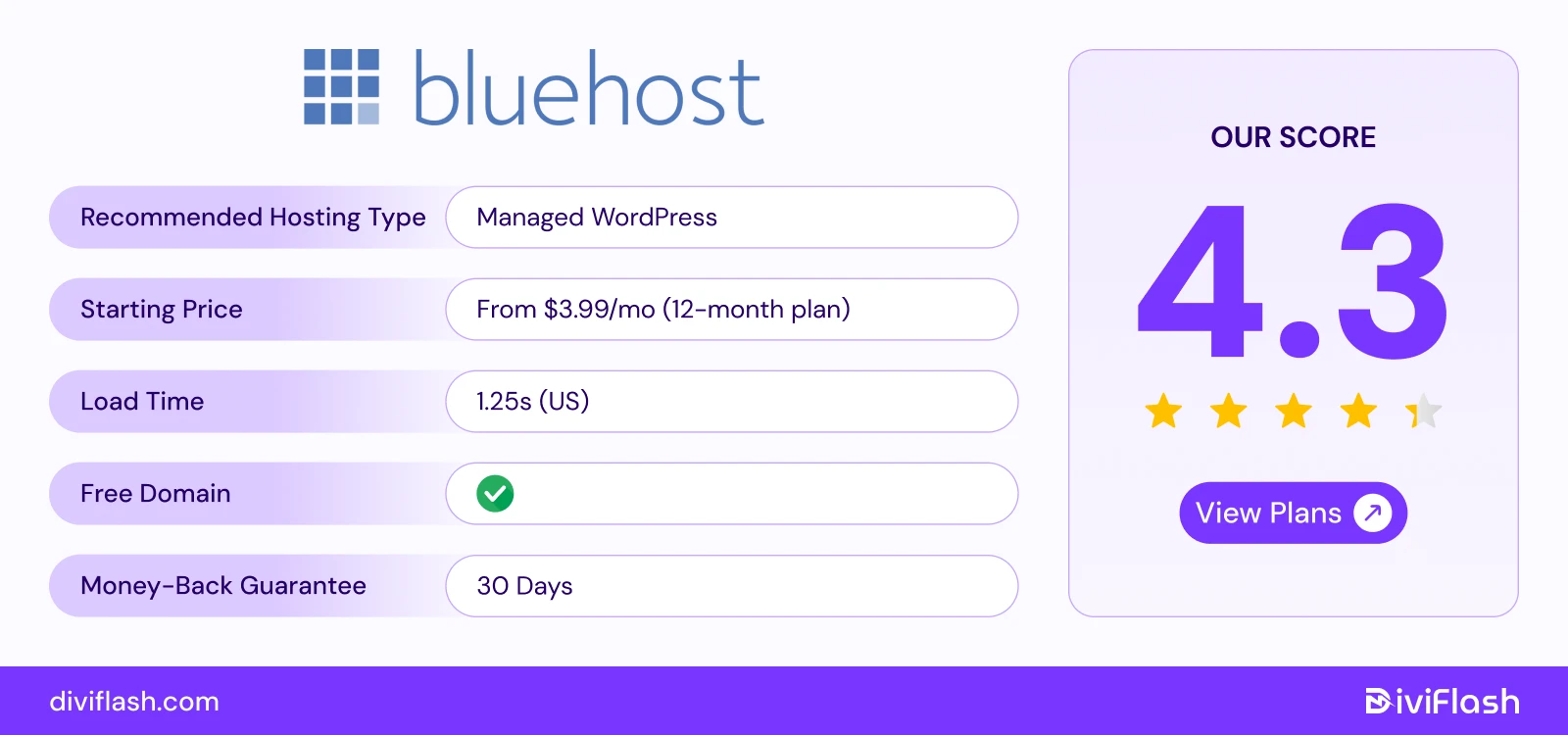
Bluehost is one of the most beginner-friendly WordPress hosting providers. It’s also officially recommended by WordPress.org. It’s ideal for users who want an all-in-one setup experience like domain registration, hosting, email, and site builder under one roof.
With its easy-to-use control panel, one-click WordPress setup, and AI-powered site builder, Bluehost makes it simple for anyone to create a website. You can get your site up and running in just a few minutes, even if you’ve never built one before.
It also offers solid performance with fast storage, built-in caching, and free CDN integration to keep your site stable and quick, even when you get more visitors.
If you choose their managed WordPress plans (like WP Pro), you’ll also get access to helpful tools such as Jetpack, daily backups, and marketing features.
Key Features of Bluehost
- Global Data Centers: Bluehost has data centers in Provo, Utah, and Houston, Texas. This helps keep your website fast and reliable for visitors.
- SSL Certificates & Security: Bluehost uses advanced Cloudflare’s CDN to make your site faster and safer.
- WordPress Focus: It’s designed to make WordPress management easy, even for beginners. It handles updates automatically, backs up your site regularly, and ensures smooth overall site performance.
- Automatic App Installs: With Bluehost, installing WordPress or other popular apps is simple and fast. You just need to click once, and the platform sets everything up for you.
- Analytics Tools: It offers built-in analytics tools that let you track your website traffic, monitor marketing campaigns, and check SEO performance. You can see which pages are performing best, and understand visitor behavior.
What we like the most
- Bluehost provides 24/7 live chat and phone support, so you can get help quickly whenever you run into issues. This makes it easy especially for beginners and small business owners to feel confident about support.
- Many Bluehost plans include business-friendly extras, such as marketing tools, Jetpack integration, and automated backups.
- Even with the Basic plan, you can create up to 20 databases. This gives you the flexibility to run multiple websites or apps from a single hosting account.
What could be better
- Bluehost does not offer free website migration, so when you migrate your existing site to their hosting, it may require extra effort or cost.
- While Bluehost provides stable performance, it has limited data servers and so the speed is average compared to some other top hosting providers.
Price of Bluehost

- Standard: Starting at $3.99/month
- VPS: Starting at $34.99/month
- Cloud: Starting at $75/month
So, if you’re a beginner or small business owner and want a simple, all-in-one WordPress hosting setup with customer support, Bluehost will be the perfect hosting solution.
Which WordPress Hosting You Should Consider based on Your Needs?
Hopefully, you have picked the right hosting plan for your site!
But if you are still a bit confused like I was before purchasing my first hosting plan, here is a quick takeaway for you based on your specific needs and the hosts we have analyzed:
- For absolute easiest start for beginners: Hostinger, Bluehost, DreamHost, SiteGround
- Developers: Cloudways, Liquid Web, Kinsta
- Agencies: WP Engine, Pressable, WPX
- Freelancers: Flywheel, Hosting
- Cost-Effective / Budget: Hostinger, DreamHost, Bluehost, Hosting
- High traffic sites: Kinsta, Rocket.net, WPX, Cloudways
- Worldwide fast reach: Kinsta, Cloudways, WPX, SiteGround
- Managed vs. VPS/Cloud:
- Managed (Hands-off, optimized): Hostinger, WP Engine, Kinsta
- VPS/Cloud (Power, control, scalability): Cloudways, Liquid Web
You can also drop a comment and let us know which hosting provider you’re planning to choose for your site and why. We’ll get back to you with an expert opinion to help you make a more well-informed decision.
FURTHER READING:


0 Comments