

Divi 5 public alpha is officially available! It brings a redesigned builder framework, faster performance, improved scalability, and many more.
And the best part is, any Divi 4 user can try Divi 5 (even on LIVE sites!)
Wondering how so?
We will show you the complete Divi 5 migration process with step-by-step instructions that a newbie can follow.
Let’s dive into the details.
What is Divi 5 and Why Migrate?
Divi 5 is the latest updated version of Divi 4. Elegant Themes redesigned Divi using a block-based framework in place of its older shortcode-based system.
The shortcode system in Divi 4 often caused slow performance, compatibility issues, and code bloat due to its complex nature. With Divi 5, these issues are gone.
You will notice faster page loading, smoother editing, and a more intuitive workflow.
All these improvements make migrating to Divi 5 a smart choice. Here are the top reasons to switch:
- Backward Compatibility: All your Divi 4 sites’ content, layouts, and customizations will work during and after migration.
- Advanced Features: New capabilities like Nested Rows, Module Groups, Loop Builder, and customizable breakpoints give you greater design flexibility.
- Improved Developer Experience: The block-based system simplifies coding and customization, with enhanced API support for developers.
- Simplified Responsive Editing: Managing responsive, hover, and sticky settings is easier and more intuitive.
- Future-Proof Architecture: Built on a lean, scalable framework, Divi 5 is optimized for modern WordPress and future web design trends.
Key Things to Know Before You Migrate to Divi 5
Wait, there are certain things that you need to keep in mind before proceeding with the migration, such as
- Update everything, your theme, child theme (If required), plugins, and the WordPress core to their latest versions.
- Always create a backup of your site including database and files. It will help you to restore your site quickly if anything goes wrong during the migration.
- It’s better to use Divi 5 on a staging site before trying it on your live site. This will let you test Divi 5 without affecting your live website.
- If you are using a Divi plugin like DiviFlash, make sure it’s compatible with Divi 5 to avoid any functionality issues. (Check DiviFlash’s Divi 5 roadmap)
Step-by-Step Guide: How to Migrate from Divi 4 to Divi 5
We are going to to show you the migration process with steps by step instructions:
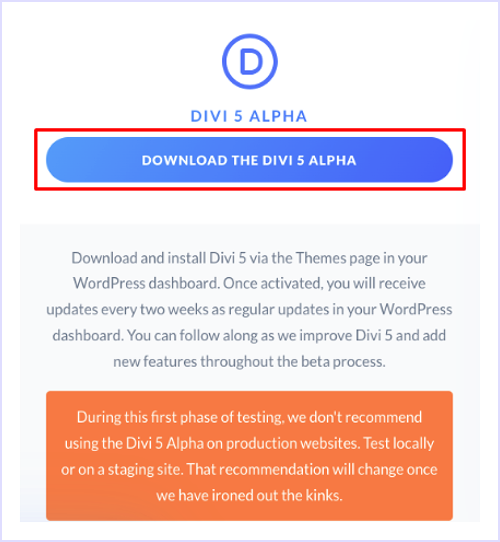
Step 1: Download Divi 5 Public Alpha
First, log in to your Elegant Themes account and download the latest Divi 5 version (public alpha).
Step 2: Install Divi 5 on Your Site
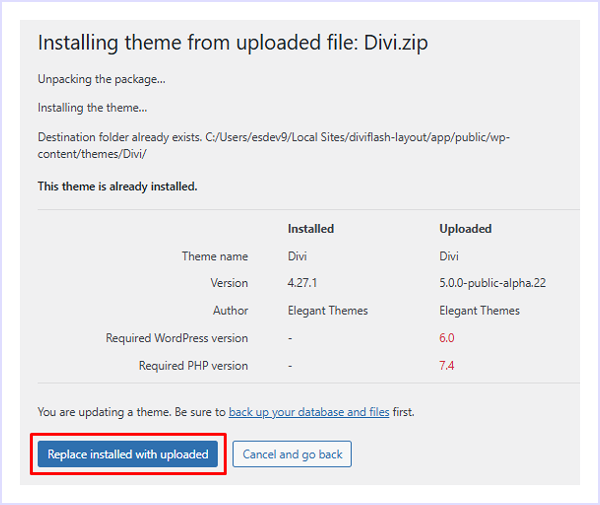
Now upload the downloaded file on your site. Here is how to do it:
- Go to Appearance > Themes > Add New and upload the Divi 5 .zip file.
- Confirm the installation to replace your existing Divi 4 theme.
Step 3: Access the Divi 5 Migrator
After the installation is complete, you can begin the migration process. Here is how:
- Navigate to Divi > D5 Migrator in your WordPress dashboard
- The migrator scans your site for Divi 4 elements, generating a report on compatible and unsupported modules
Note: If you see any incompatible items, you can still migrate. Divi 5 Migrator automatically places these items in "backward compatibility mode." (This mode keeps incompatible items working by using the Divi 4 system, ensuring site stability while waiting for full Divi 5 support.)
- Click “Migrate This Site to Divi 5 Alpha” button
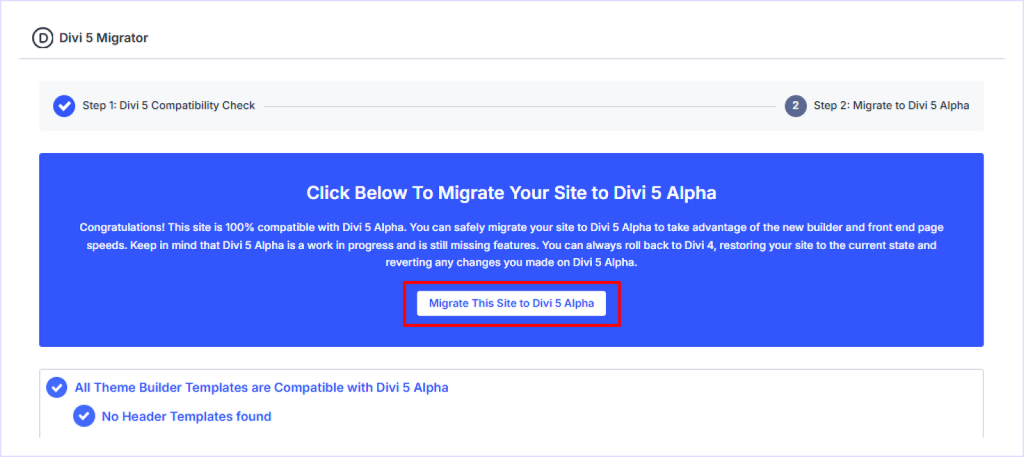
- Confirm the migration prompt to start the process
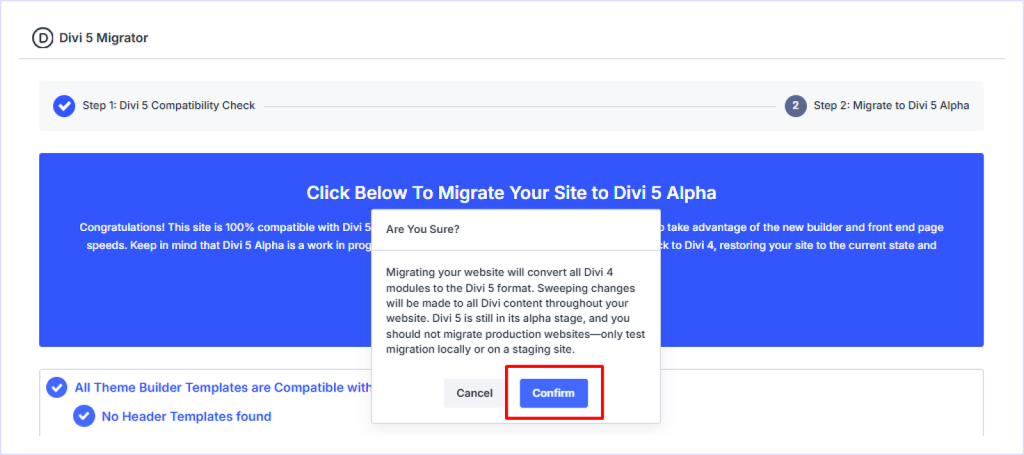
Once the migration is complete, begin a thorough check of your entire website. You can do things like:
- Visit all your pages and posts to ensure layouts, styling, and content are displayed correctly.
- Open pages in the new Divi 5 Visual Builder to get a feel for the updated interface and ensure all modules can be edited properly.
- Test the functionality of all your third-party plugins to confirm they are working as expected.
Troubleshooting Common Divi 5 Migration Issues
Don’t panic if you face any issue or inconvenience after migrating to Divi 5. You can face certain problems and here are solutions of them:
- Layouts Look Broken: This usually happens due to incompatible plugins. Just ensure your Divi plugin’s compatibility with Divi 5.
- Builder Glitches: The new interface may have bugs, as it’s in a public alpha stage. To get rid of it, clear your browser, Divi, and any caching plugin's cache.
- Slow Performance: If a page contains unsupported legacy modules, it will use a compatibility layer that can affect performance. To fix it, contact your chosen Divi plugin makers’ developers.
- Migration Fails: This can happen due to not matching the required requirements. Simply check your Divi > Support Center > System Status and adjust your PHP limits accordingly. Alternatively, you can go back to Divi 4 again.
How to Revert to Divi 4 Again
In case your migration fails (Divi 5 is still in public alpha), don’t worry. You can easily go back to Divi 4.
Here is how to do it:
- Navigate to Divi > D5 Migrator
- Click Restore Divi 4 Content button
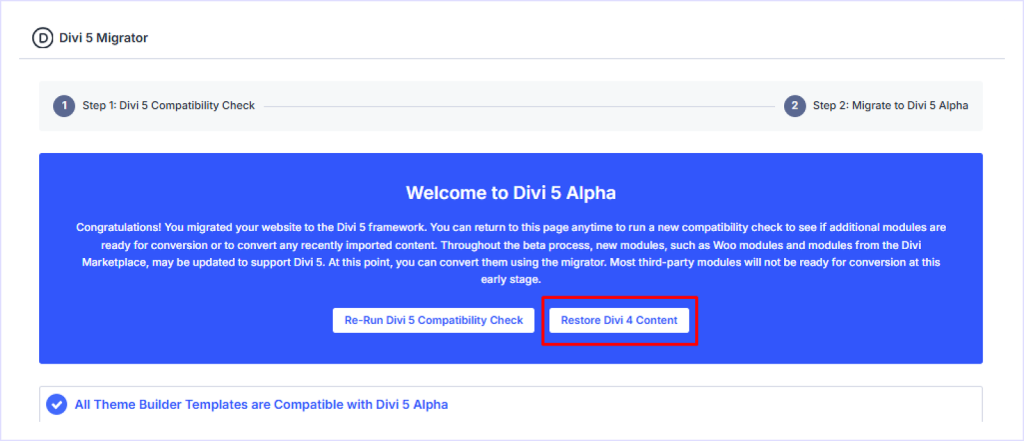
And that’s it. Your site will be back on Divi 4 safely.
Divi 4 vs. Divi 5 Performance
In this section, you will get a clear side-by-side comparison of Divi 4 and Divi 5 performance:
| Feature | Divi 4 | Divi 5 |
| Architecture | Shortcode-based | Block-based |
| Memory Usage | ~200M for complex pages | Up to 50% less |
| Page Load Time | Slower due to shortcodes | 20-30% faster |
| Server Resources | Higher CPU usage | Optimized for lower CPU and memory usage |
| Editing Speed | Noticeable lag on complex layouts | Smoother, faster editing experience |
FAQs on Divi 5 Migration
- Is DiviFlash compatible with Divi 5?
Yes, DiviFlash is actively working on full compatibility with Divi 5. Check their changelog for updates.
- Is Divi 5 ready for live sites?
Though Divi 5 is in public alpha, it can be tested on staging or local sites safely. However, many Divi users are using Divi 5 on their live sites successfully, often with careful testing, backups.
- How long does migration take?
Depends on your site size. Small sites may migrate in minutes, while larger ones could take longer.
- Will Divi 4 layouts work in Divi 5?
Yes, Divi 5’s backward compatibility ensures layouts function, though unsupported modules may run in legacy mode.
- Do I need to rebuild my site after migrating?
No, but some adjustments may be needed for custom code or third-party Divi modules.
- What if third-party modules aren't supported?
You may need to wait for developers to release Divi 5-compatible versions.
- Will Divi 4 stop working?
No. Divi 4 will continue to work and be supported until Divi 5 is fully stable, so you don’t need to worry about it suddenly breaking.
- Will future updates require migration again?
No. Once you migrate to Divi 5, all future updates will happen within Divi 5 itself. You will not need another migration.
Conclusion
So what do you think? When are you going to try Divi’s game-changing upgraded version? You must be excited like many long-time Divi users.
We encourage you to try Divi 5. You might never want to go back to Divi 4 ever again (it's like going from a flip phone to a smartphone.)
However, if you still have any issues during Divi 5 migration, feel free to comment. We would be more than happy to help you with your issue.
Try Divi 5 today on a staging site today and explore its new block-based workflow. And if you want extra design freedom, pair it with DiviFlash for maximum customization.


0 Comments